Managing scan execution
Scan History: rerunning, resuming, stopping and downloading scans.
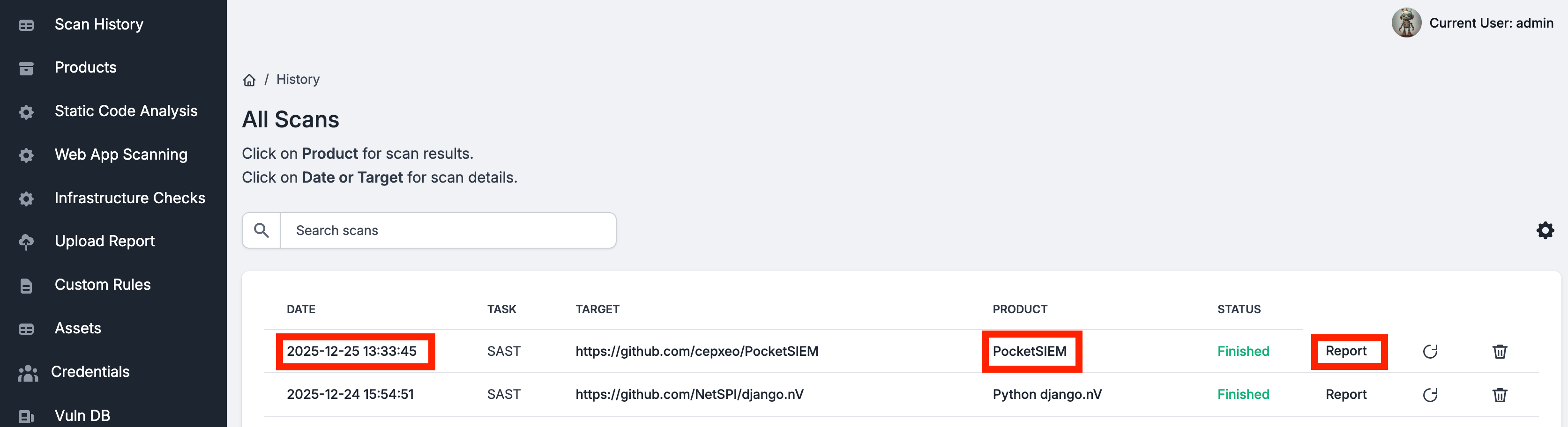
Scan History lists every scan, newest first. Click a scan's date or target to open its page, where you follow a running scan and see what a finished one changed — see The scan page.
Reading the list
| Column | What it shows |
|---|---|
| Date & Time | When the scan started. Opens the scan's page. |
| Type | SAST, DAST or Infra. |
| Target | The repository, URLs or hosts scanned. Opens the scan's page. |
| Environment | The product the scan belongs to. |
| Status | Queued, Started, Finishing, Finished, Failed, or Cancelled for a scan you stopped. |
| LLM Tokens | The tokens the scan spent; hover for prompt, completion and LLM calls. Once LLM prices are set, the cost shows underneath. |
| Actions | Stop, Report and Rerun — see below. |
Controlling scans
| Action | What it does |
|---|---|
| Stop | Asks first, then cancels a running or queued scan and stops its containers. The scan becomes Cancelled. |
| Report | Downloads the report archive. Greyed out as Report unavailable when the scan wrote none. |
| Rerun | Runs the scan again the same way: a Custom Scope scan with the same patterns, a Verify Fixes scan with the same findings, an Incremental or Monitor scan as one. A rerun of a monitor that was deleted becomes a full scan. If the rerun is refused — for example, a repository with no new commits — the message says why. |
| Resume AI analysis | Replaces Rerun for an AI SAST scan that stopped part-way; the hint names the stage it stopped during. The analysis continues from its last checkpoint instead of starting over. |
Tick scans to act on several at once:
- Stop selected stops the running ones.
- Download reports downloads one ZIP holding each scan's report as
<scan id>-report.zip. - Delete selected deletes the scan records; running scans are left alone.
Clear History deletes every scan record. It is shown to administrators only.
Deleting a scan record does not delete the findings it produced; they stay on the Vulnerabilities page.
Searching
The search bar above the list searches targets, types and environments. To search across assets, vulnerabilities, scans and credentials at once, use Global search and system logs.
Scan History shows the team's scans. Stop, Delete, Rerun and Report each follow the member's role; see Teams and roles.
Last reviewed 2026-09-25