Products
Every product ranked by open risk, with what needs attention first.
Every finding, scan and asset is filed under a product, so create one before the first scan. The Products page then ranks your products by open risk and says which of them need attention first.
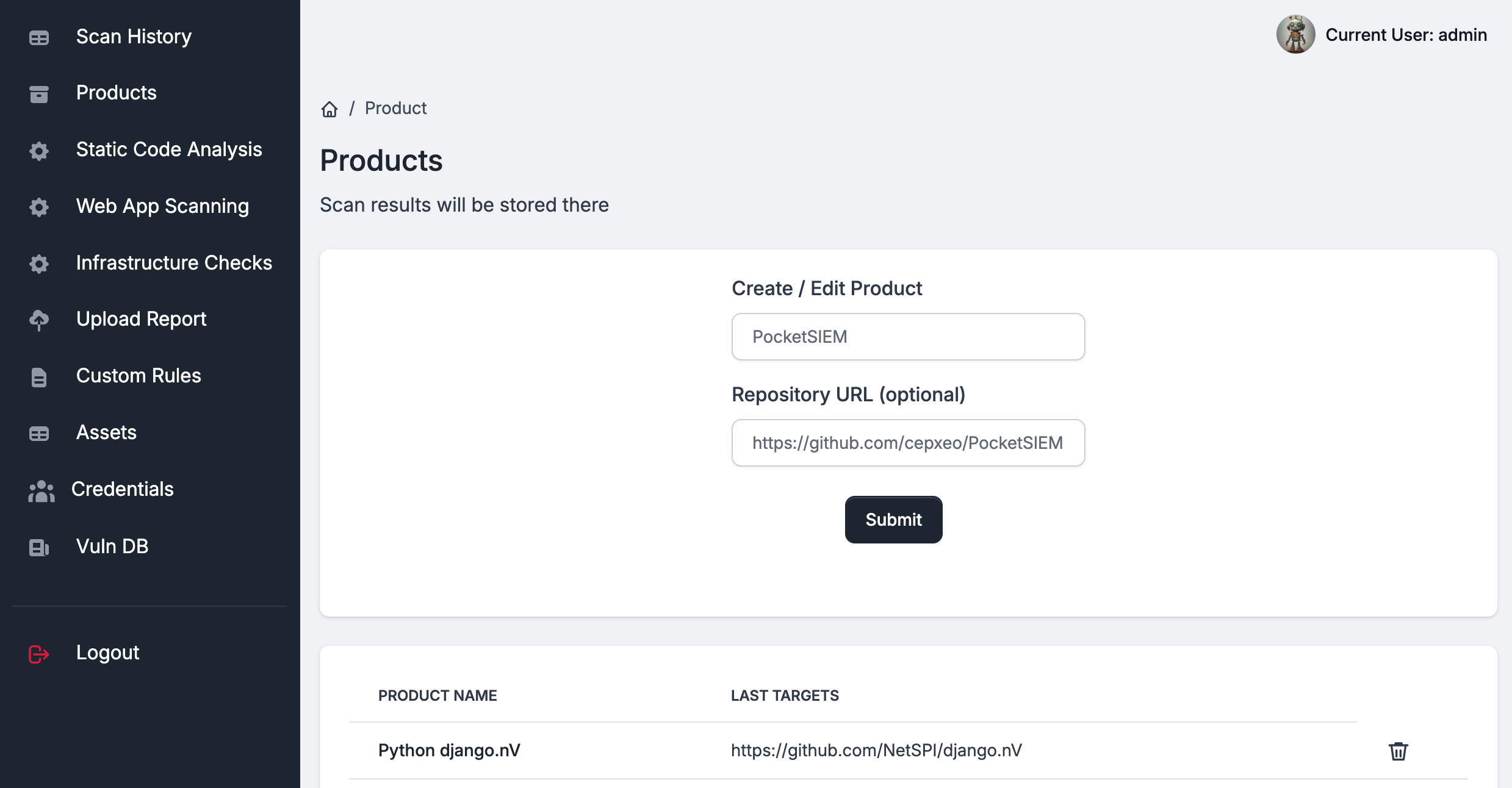
Creating a product
Click New product, give the product a unique name and, optionally, the repository it covers, and click Create product. The repository URL is not required, but static analysis findings then link straight to the offending lines.
Choose the name carefully: findings carry it, so it cannot be changed later.
Reading the summary
| Tile | What it shows |
|---|---|
| Products | How many products there are, and how many were not scanned in the last 30 days. |
| Open findings | Every open finding by severity. Resolved, False Positive and Risk Accepted findings do not count. |
| Critical open | Open critical findings, and how that number moved in the last 7 days. |
| Overdue | Open findings past their due date. See the deadlines in Vulnerability Management. |
| Verified secrets | Secrets confirmed to be valid, and in how many products. |
| Scans, 30 days | Scans started in the last 30 days, how many failed, and the LLM spend. |
What needs attention
The Needs attention panel lists the most urgent problems across products, worst first. Each item has a button that opens the place to act on it.
| Item | What to do |
|---|---|
| N critical open for more than 14 days | Review the critical findings of that product. |
| N verified secrets | Rotate the secrets and remove them from the code. |
| last scan failed | Open the scan and read why it failed. |
| N findings reopened in 7 days | A fix did not hold; review the findings. |
| N findings past their due date | Fix them, or agree a new date and record it. |
| not scanned for N days | Scan the product again, or schedule it. |
| never scanned | Run its first scan. |
The panel shows eight items; filter the list below it to see the rest.
The product list
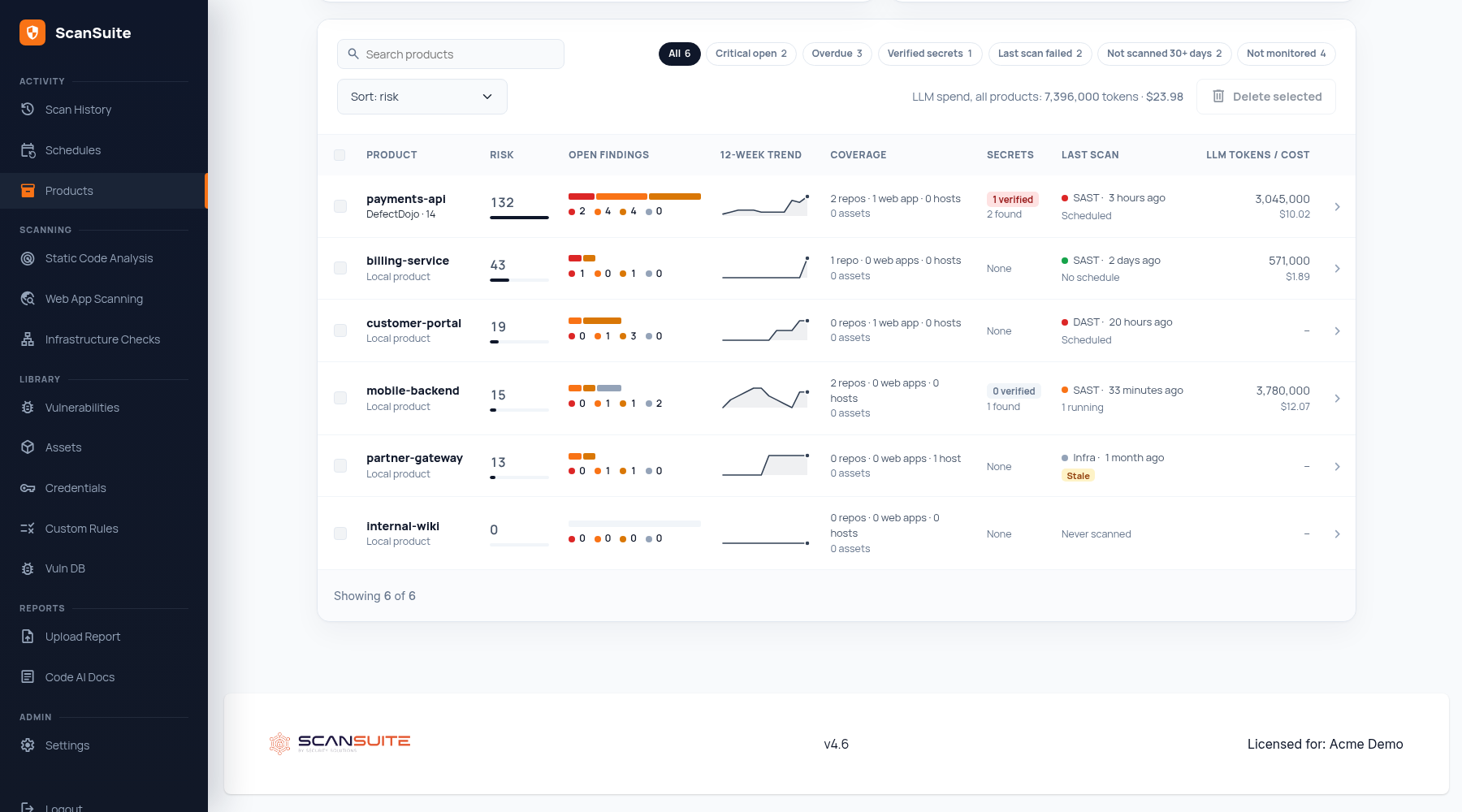
| Column | What it shows |
|---|---|
| Risk | The product's risk score (see below) and how it compares with the riskiest product. |
| Open findings | Open findings by severity. |
| 12-week trend | Open findings at the end of each of the last twelve weeks. |
| Coverage | Repositories, web apps and hosts its scans covered, and its assets. |
| Secrets | Verified secrets, and how many were found. |
| Last scan | The latest scan, when it ran and how it ended. Stale marks a product not scanned for 30 days. |
| LLM Tokens / Cost | What AI scans of the product have spent. |
The risk score weighs each open finding by its severity: a Critical counts 40, a High 10, a Medium 3 and a Low 1. The Top 10 panels on the Vulnerabilities page rank by the same score.
Click a product to open its page — see The product page. If the product is linked to DefectDojo, the DefectDojo line under its name opens the engagement.
Filtering, sorting and exporting
- Filters: All, Critical open, Overdue, Verified secrets, Last scan failed, Not scanned 30+ days and Not monitored, each with the number of products it matches.
- Search by product name.
- Sort by risk (the default), open findings, last scan, name or LLM spend.
- Export CSV writes one row per product: its risk score, open findings by severity, overdue findings, coverage, secrets, last scan, recent scans and failures, and LLM spend.
The filters and the sort order are kept in the page address, so a filtered view can be bookmarked or shared.
Deleting products
To delete several products, tick them in the list and click Delete selected. To delete one, use the Settings tab of its page, where you type the product's name to confirm.
Deleting a product deletes all its findings, secrets and scan records, and its DefectDojo product where that integration is configured. There is no undo.
How to organise products
There is no single right answer, but two habits pay off:
- One product per application. A product can hold several repositories, web apps and hosts, and its page lists each of them separately.
- Keep unrelated applications apart, so risk, trends and deadlines mean something per product.
Last reviewed 2026-09-25