GitLab CI step by step
From a token to merge requests blocked by real findings: GitLab variables, the runner, the template, reading the results, and tested recipes.
This guide takes a GitLab project from nothing to ScanSuite scans that gate merge requests and the default branch. Follow the steps in order the first time: each one is a few clicks, and at the end a pipeline fails on real vulnerabilities and you can see them both in GitLab and in ScanSuite. The recipes after that add nightly scans, release gates, DAST and container image scans.
Pipeline scans use the team API, which is part of ScanSuite Teams.
Every screenshot and result below comes from a test run on GitLab CE 19 with a self-hosted runner, against a sample Flask application with known problems: SQL injection, command injection, path traversal, vulnerable dependencies and a committed GitHub token. The option reference for the client is in CI/CD and automation.
How it works
A GitLab job runs the ScanSuite CI client from the image appsec4u/scansuite-ci:1. The client packs the files Git tracks in the checkout, uploads them to your ScanSuite server, starts a scan and waits for it. The scan runs on the ScanSuite server, so the runner needs no scanners and little memory. When the scan ends, the client checks the results against the gate (by default: any High or Critical finding, or any secret new to the product), writes the reports and exits:
| Result | What you get |
|---|---|
| The job passes | Nothing blocks. The findings are still in ScanSuite. |
| The job fails | The log lists every blocking finding and secret; the pipeline's Tests tab and the merge request show them as failed tests. |
| Reports | scansuite-junit.xml (GitLab test report), scansuite.json (summary) and scansuite.sarif, kept as job artifacts for 30 days. |
Before you start
| You need | Details |
|---|---|
| ScanSuite | A team on a ScanSuite Teams server, and the Team admin role in it (to create a service account). |
| A product | The ScanSuite product the findings go to. Create it on the Products page, or let the first pipeline create it (see Recipes). |
| GitLab | The Maintainer role in the project, to change its CI/CD settings and merge checks. |
| A runner | A GitLab runner with the Docker executor that accepts untagged jobs, can pull appsec4u/scansuite-ci:1 from Docker Hub and reaches your ScanSuite server over HTTPS. Shared runners on GitLab.com qualify when the server is reachable from the Internet. |
Step 1. Create a token in ScanSuite
The pipeline signs in with the token of a service account, not with a person's password. A service account belongs to the team and keeps working when people leave it.
- 01Open the Teams page
Teams in the sidebar (Admin section), then the People tab. Scroll to Automation and API tokens.
- 02Create a service account
Under NEW SERVICE ACCOUNT, type a name such as gitlab-ci, set ROLE to Operator (the default, Reader, cannot start scans) and select Create.
- 03Issue a token
Select New token on the new account. Give it a name, a lifetime of up to 90 days, keep the CI pipeline preset and select Create token.
- 04Copy the token
It is shown once. Keep it in your clipboard for step 2; if you lose it, revoke it and issue another.
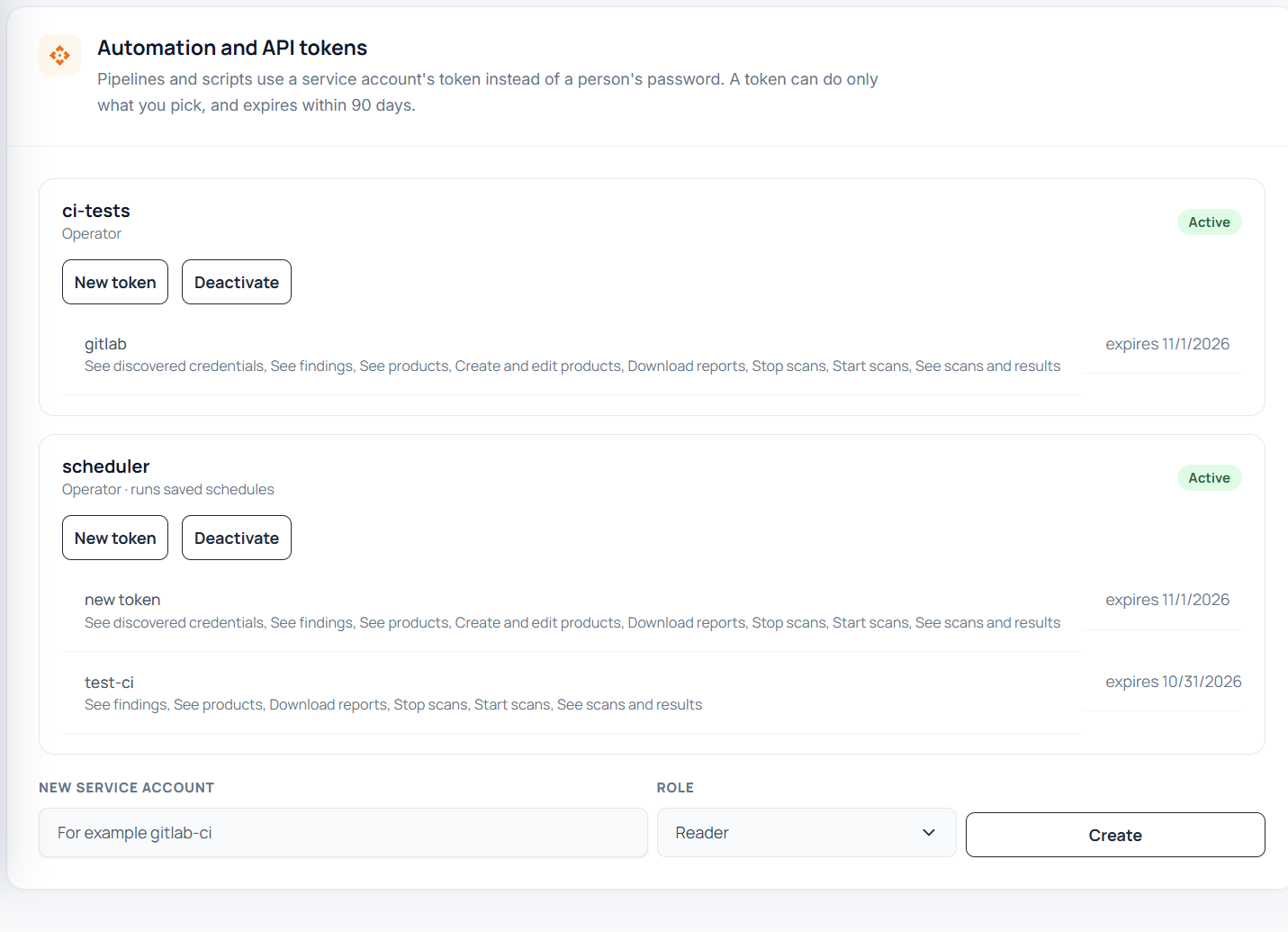
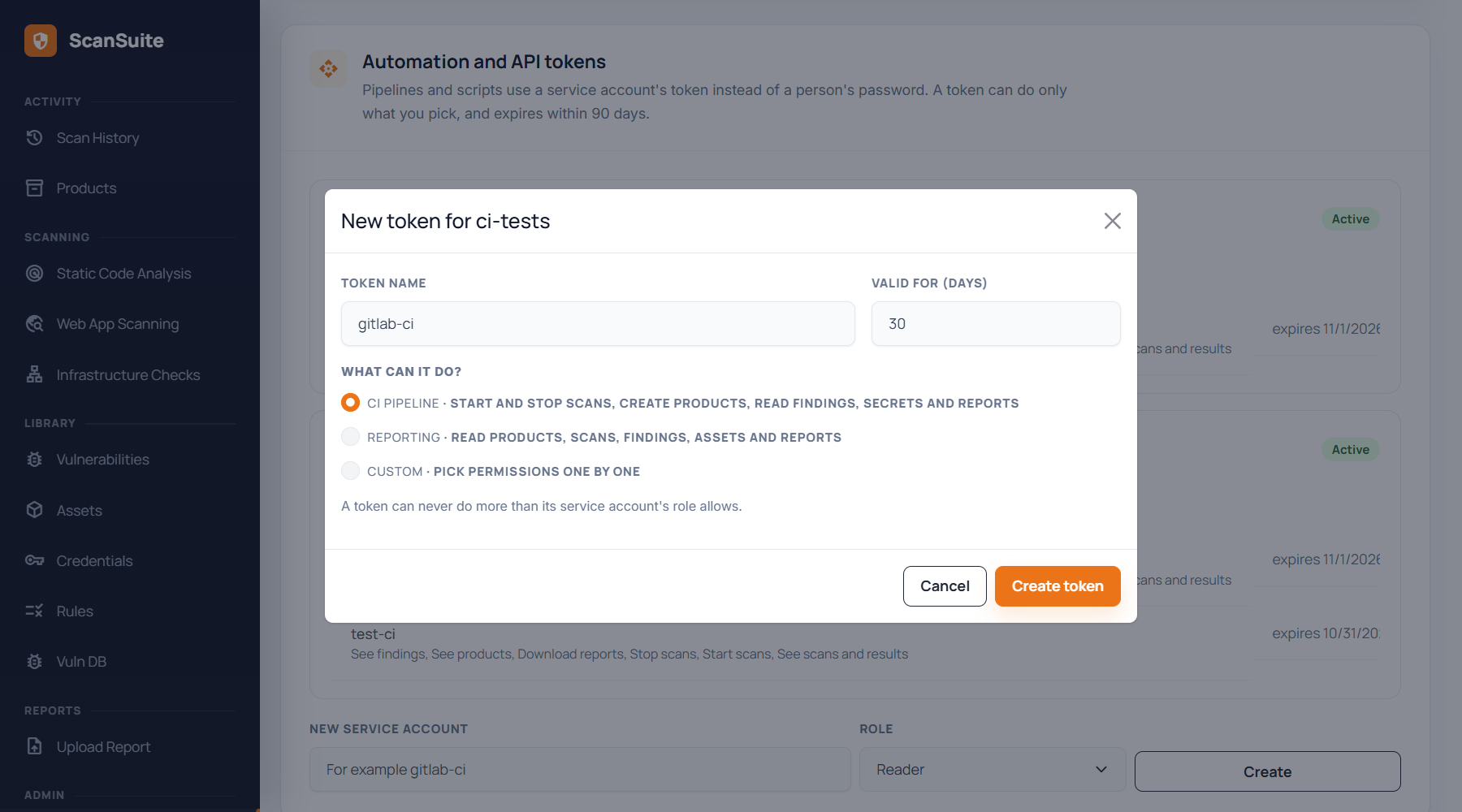
The CI pipeline preset gives the token what a pipeline needs and nothing more: start and stop scans, see scans, findings, products and discovered credentials, download reports, and create products. Each token is listed with its permissions and expiry date; the job log warns when the token expires within 14 days.
Step 2. Add the CI/CD variables in GitLab
In the GitLab project: Settings → CI/CD → Variables → Add variable, once for each variable:
| Key | Value | Visibility and flags |
|---|---|---|
| SCANSUITE_URL | The address of your ScanSuite server, for example https://scansuite.example.com | Visible |
| SCANSUITE_TEAM | The team's short name. On My account (user menu) each team links to an address ending in ?team=<short name>. | Visible |
| SCANSUITE_PRODUCT | The product's exact name, as on the Products page. Or SCANSUITE_PRODUCT_ID with its number. | Visible |
| SCANSUITE_TOKEN | The token from step 1. | Masked, Protect variable cleared |
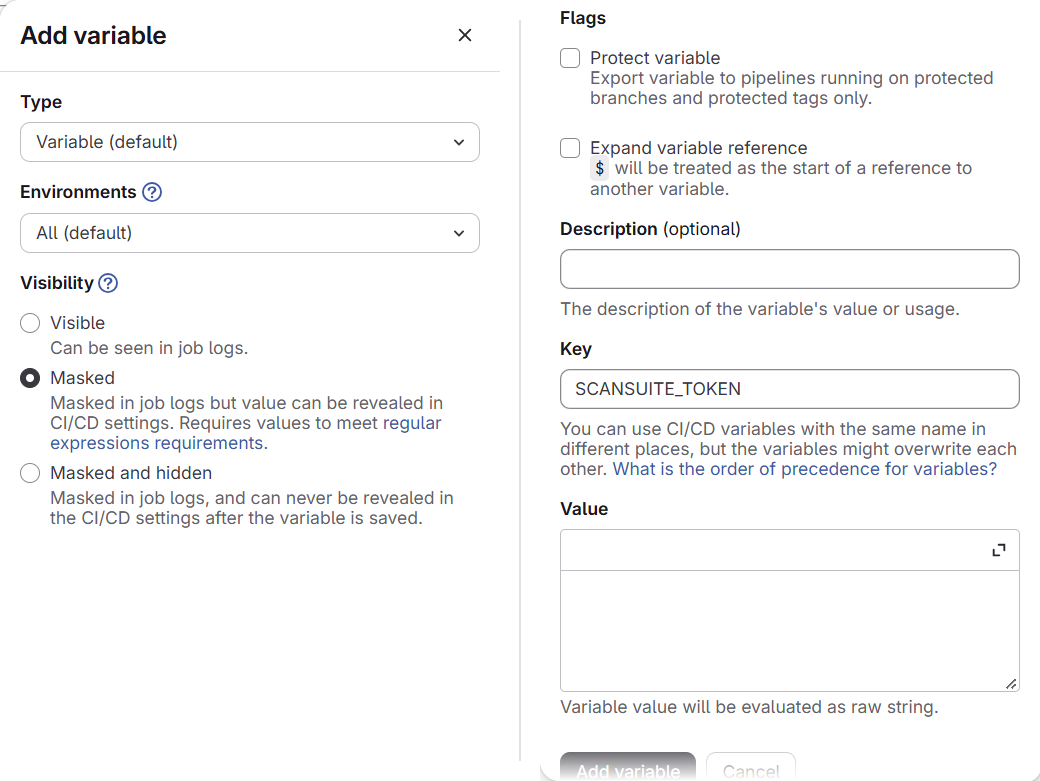
GitLab ticks Protect variable by default. A protected variable reaches only pipelines on protected branches and tags, so every merge request from an ordinary branch fails with Set SCANSUITE_TOKEN ... and exit code 3. Protect it only if every pipeline that scans runs on a protected branch or tag.
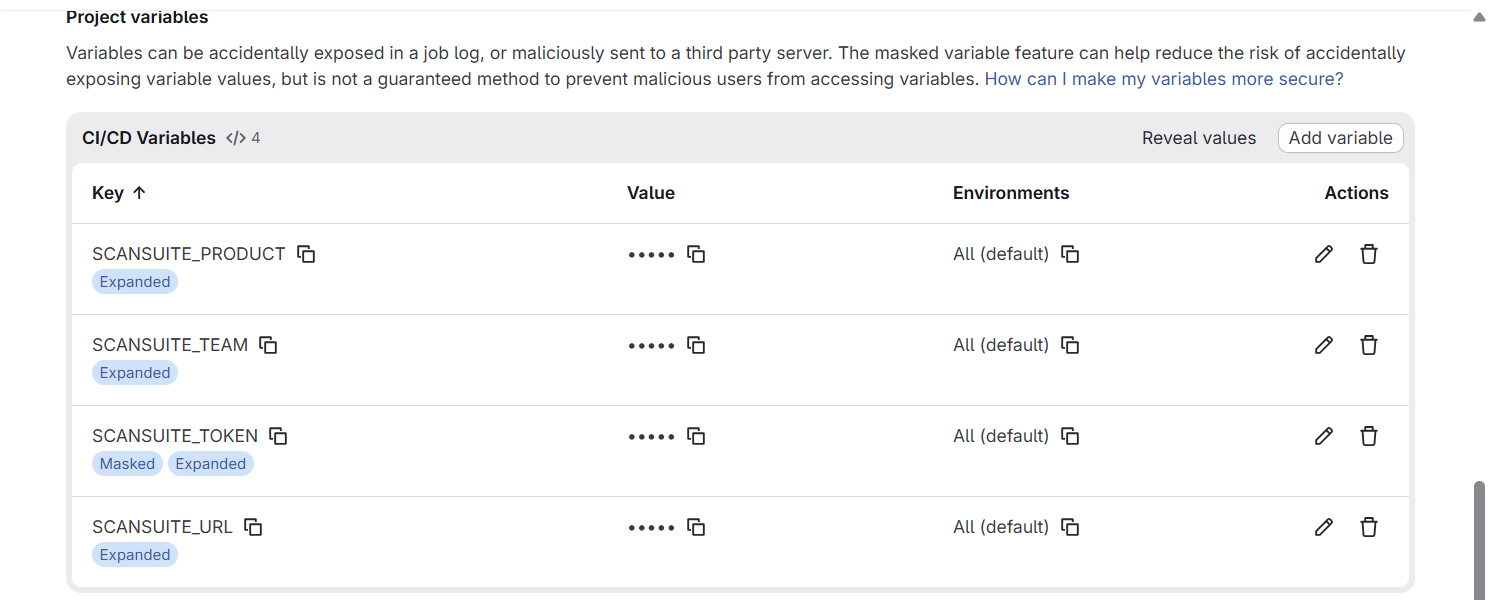
Variables set here apply to every job and win over variables written in .gitlab-ci.yml. Keep that in mind when one job should report to a different product: see Monorepo.
Step 3. Check the runner
Settings → CI/CD → Runners lists the runners the project can use. One of them must be Online, use the Docker executor, and run untagged jobs. If your runners only take tagged jobs, add the tag to the template's hidden job in your .gitlab-ci.yml:
.scansuite:
  tags: [docker]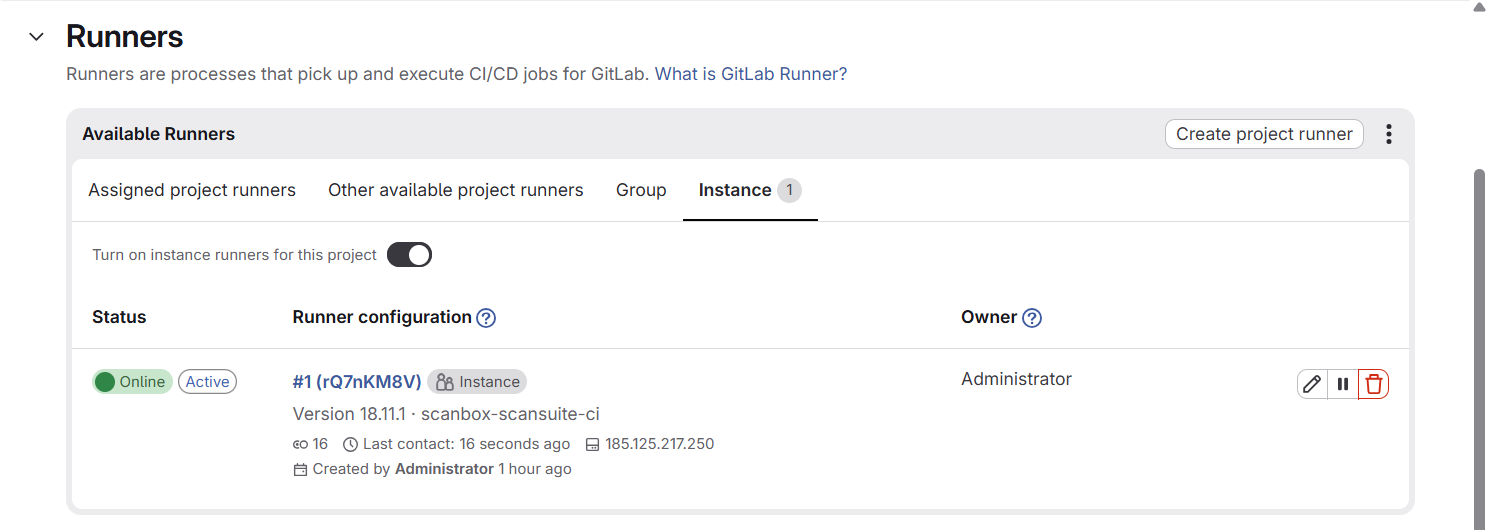
Step 4. Add the pipeline
Your ScanSuite server serves a GitLab CI template that always matches its version. Add this to .gitlab-ci.yml in the root of the repository (create the file if the project has none), with your server's address:
include:
  - remote: 'https://scansuite.example.com/ci/scansuite.gitlab-ci.yml'
That adds two jobs in the test stage:
| Job | Runs on | Scan |
|---|---|---|
| scansuite-merge-request | Every merge request | quick-classic (rule-based Semgrep, no AI) on the files the merge request changes |
| scansuite-default-branch | Every push to the default branch | standard-ai (AI SAST with reachability, secrets with AI verification, dependency checks) on the whole repository |
Commit the file to the default branch. The push starts the first pipeline.
Your pipeline already has stages? Keep them and add test if it is missing: the template's jobs run in the test stage. If you would rather not include a remote file, copy the template's content from the same address into your repository; AI SAST reports an unpinned remote include as a Medium finding.
Step 5. Read the result in GitLab
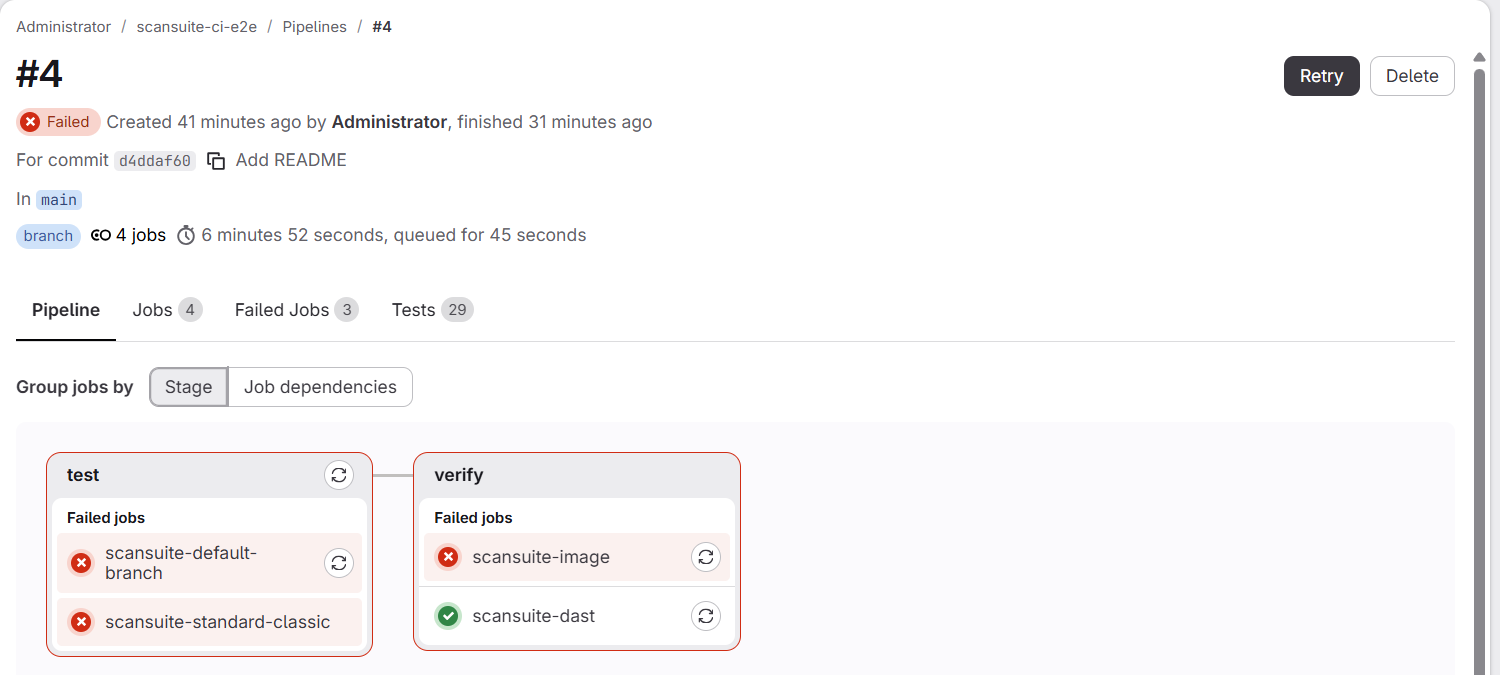
Open Build → Pipelines and the newest pipeline. In the test run the default branch job took three minutes and failed, as it should on this application:
Open the failed job. The end of its log says what the scan found and why the job failed:
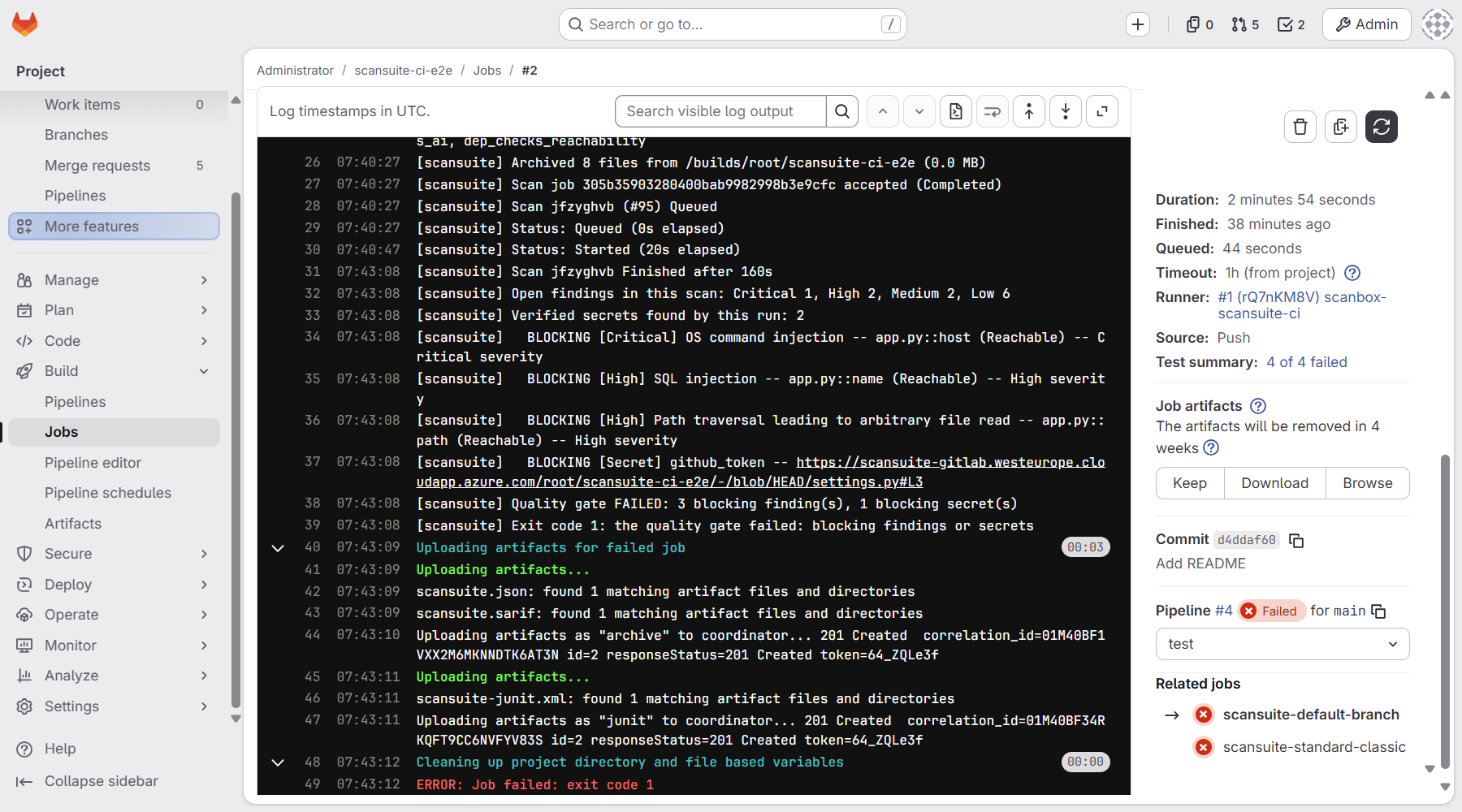
| Log line | Meaning |
|---|---|
| Scan jfzyghvb (#95) Queued … Finished after 160s | The scan's reference; search for it in ScanSuite. |
| Open findings in this scan: Critical 1, High 2, … | Everything the scan reported. |
| BLOCKING [Critical] OS command injection -- app.py::host (Reachable) | One line per finding that fails the gate, with the file, the code location and the reason. |
| BLOCKING [Secret] github_token -- …/settings.py#L3 | A secret that blocks, with a link to the file in GitLab. |
| Quality gate FAILED: 3 blocking finding(s), 1 blocking secret(s) | The verdict. |
| Exit code 1: the quality gate failed … | Why the job failed. GitLab always prints exit code 1 below it; this line has the real code (see Troubleshooting). |
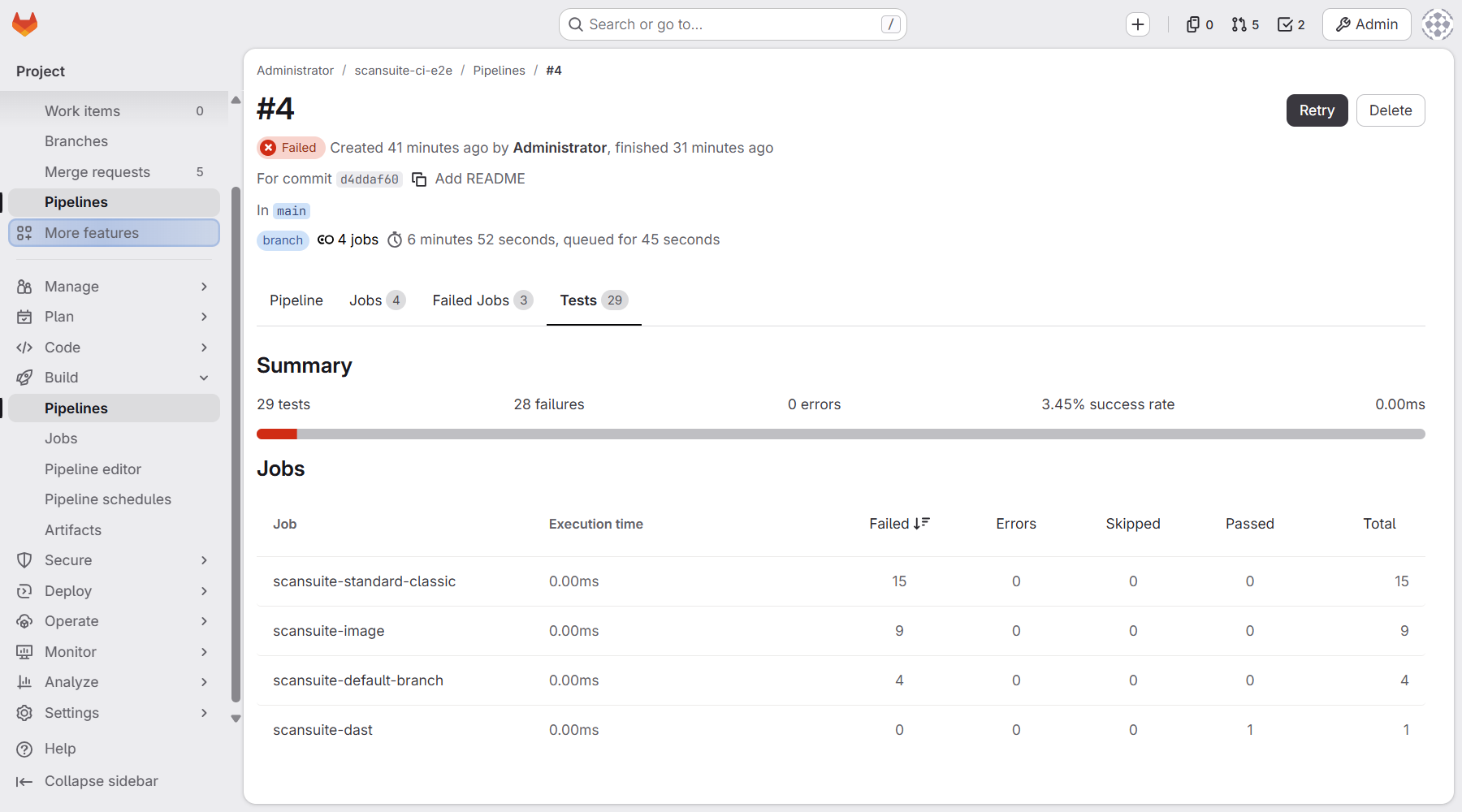
The pipeline's Tests tab shows each blocking finding as a failed test, per job. Download or Browse under Job artifacts on the job page gives the JSON and SARIF reports.
Step 6. See the findings in ScanSuite
Every pipeline scan is an ordinary scan of the product: it appears in Scan History under the name of the project's archive, for example scansuite-ci-e2e.zip. Its page shows what the scan changed, and View findings lists them with severity, location and reachability. Triage there as usual: the gate counts only findings that are Open or In Progress, so a finding you close as a false positive or accepted risk no longer fails the next pipeline.
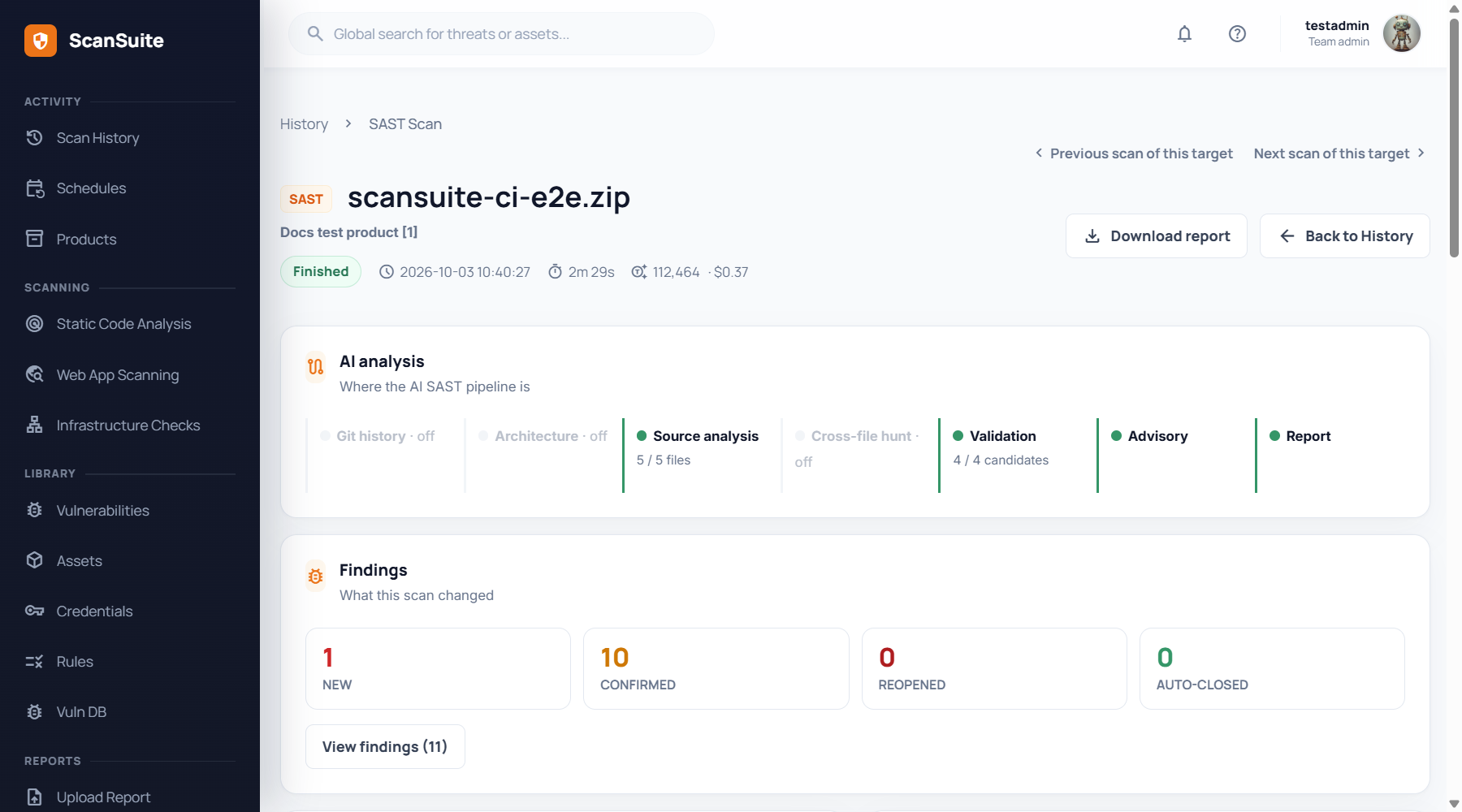
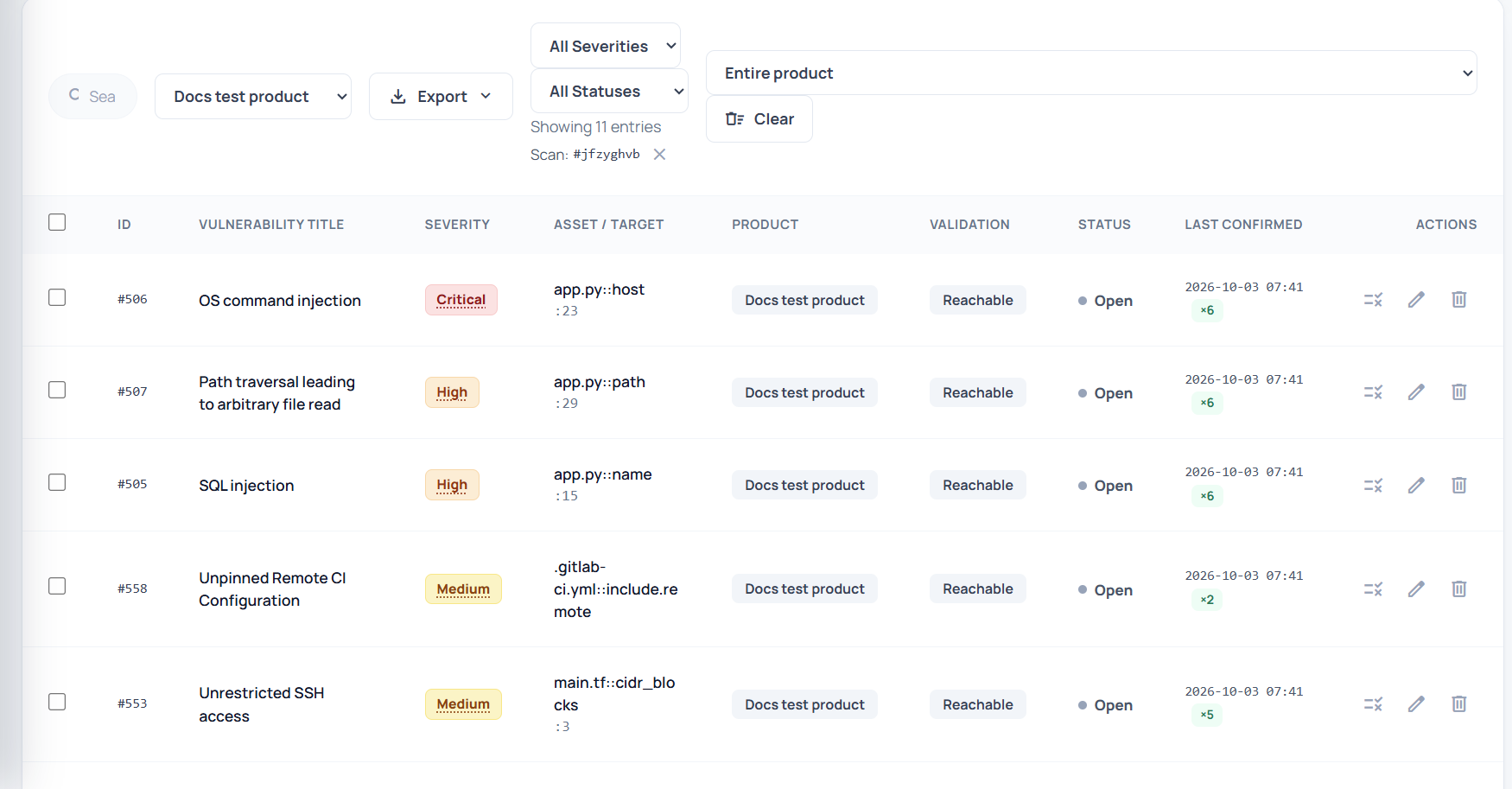
Findings link to the file and line in GitLab at the scanned commit, because the client sends the repository address and commit with the upload.
Gate merge requests
A failed job blocks merging only when the project asks for it: Settings → Merge requests → Merge checks → Pipelines must succeed.

The merge request then shows the blocking findings as failed tests and refuses to merge until a pipeline passes:
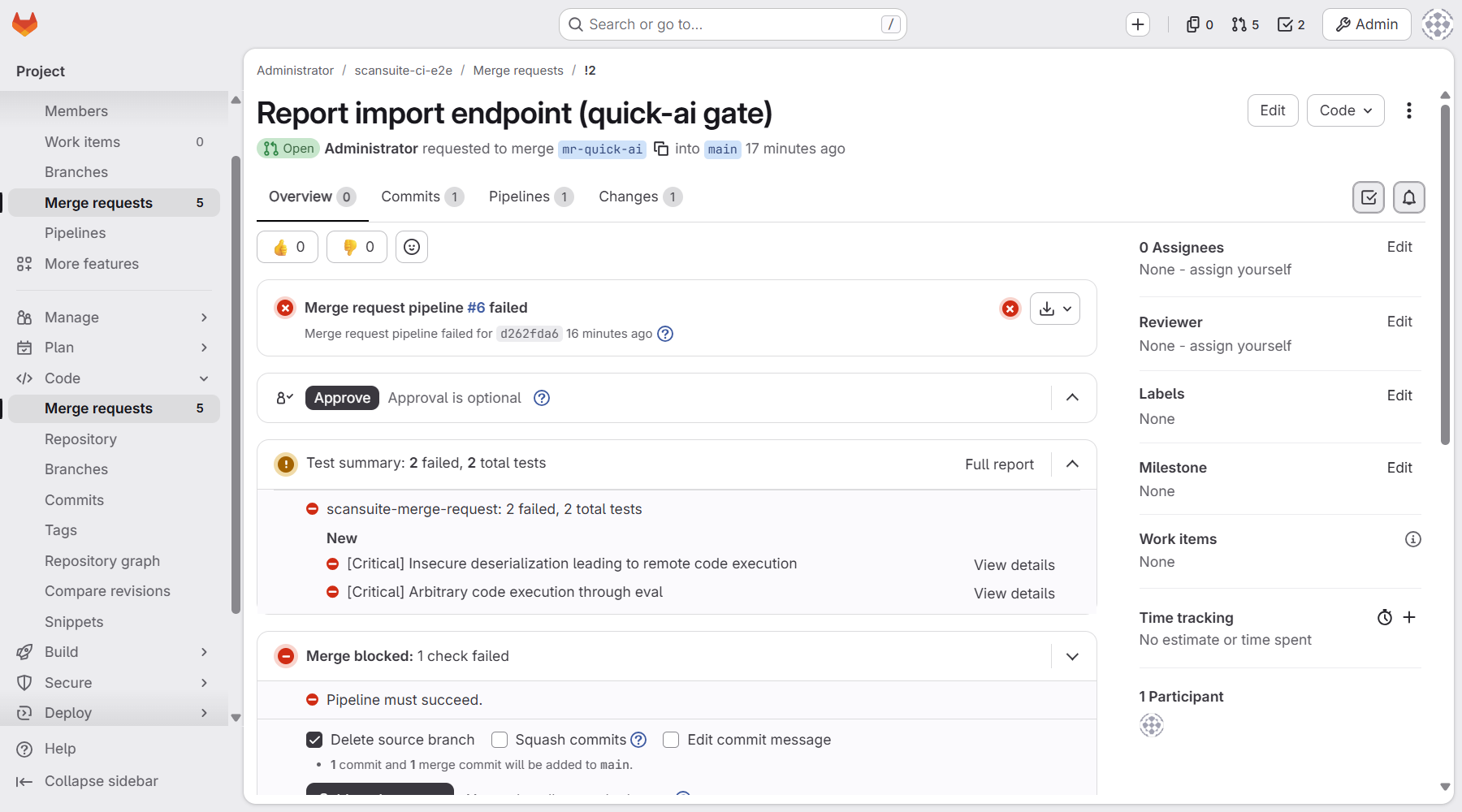
Choose the merge request scan with care. In the test, a branch added pickle.loads on request data and an eval of a query parameter:
| Merge request scan | Result |
|---|---|
| quick-classic (the template's default) | Passed in about a minute: the rule-based rules did not match either line. |
| quick-ai | Failed in about 30 seconds with two Critical findings: insecure deserialization and code execution through eval. |
If your team has AI set up, make quick-ai the merge request gate. Both scan only the changed files; secrets and dependency checks need the whole repository and run on the default branch.
include:
  - remote: 'https://scansuite.example.com/ci/scansuite.gitlab-ci.yml'

scansuite-merge-request:
  variables:
    SCANSUITE_PROFILE: quick-ai
A merge request that changes only files you exclude (for example SCANSUITE_EXTRA_ARGS: --exclude docs/*) passes at once: there is nothing to scan.
Choose what to scan, and when
| Trigger | Without AI | With AI | Time in the test |
|---|---|---|---|
| Merge request | quick-classic | quick-ai | About a minute |
| Default branch | standard-classic | standard-ai | 3 to 4 minutes |
| Nightly or release | full-classic | full-ai | full-ai: 7 to 25 minutes, far longer on large code bases |
Set the bundle with SCANSUITE_PROFILE on a job. On the sample application, standard-ai blocked on 3 findings (the injections and the path traversal, all confirmed reachable) and one verified secret; standard-classic blocked on 15, including the same injections found by several Semgrep rules and the vulnerable pyyaml, flask, jinja2 and requests versions.
Tune the gate
Each option is a variable you can set on a job (or for the whole project):
| Variable | Default | What fails the job |
|---|---|---|
| SCANSUITE_FAIL_ON_SEVERITY | high | The lowest severity that fails the job; none turns it off. |
| SCANSUITE_MAX | How many findings of each severity are allowed, for example high=0,medium=10. | |
| SCANSUITE_BLOCK_CLASS | Classes that fail the job at any severity, for example sql_injection,command_injection. | |
| SCANSUITE_MIN_CONFIDENCE | any | reachable: only findings AI confirmed reachable, or with a known exploit, fail the job. |
| SCANSUITE_FAIL_ON_SECRETS | new | new: secrets the product did not have before; all: every secret; none: never. |
In the test, SCANSUITE_FAIL_ON_SEVERITY: critical with SCANSUITE_BLOCK_CLASS: sql_injection,command_injection,code_injection still failed the job on the High SQL and command injections; the log marks them blocked class sql_injection instead of High severity.
The first scan of a product sees every secret as new. A job that creates the product, or the first scan of an existing repository, fails on secrets already committed. Triage them in ScanSuite, or start with SCANSUITE_FAIL_ON_SECRETS: none.
Recipes
Each recipe is a job to add to .gitlab-ci.yml under the include. Jobs extend the template's hidden .scansuite job, which brings the image, the reports and the artifacts.
DAST and container image scans
Run them in a later stage, after the deployment and the image build. needs: [] lets them start even when a static scan failed the build; without it GitLab skips them, which is exactly when you want them.
stages: [test, verify]

scansuite-dast:
  extends: .scansuite
  stage: verify
  needs: []
  variables:
    SCANSUITE_SCAN_TYPE: dast
    SCANSUITE_TARGETS: https://staging.example.com
    SCANSUITE_PROFILE: quick
    SCANSUITE_FAIL_ON_SEVERITY: critical
  rules:
    - if: $CI_COMMIT_BRANCH == $CI_DEFAULT_BRANCH && $CI_PIPELINE_SOURCE != "merge_request_event"

scansuite-image:
  extends: .scansuite
  stage: verify
  needs: []
  variables:
    SCANSUITE_SCAN_TYPE: infra
    SCANSUITE_TARGETS: registry.example.com/shop/api:$CI_COMMIT_SHORT_SHA
    SCANSUITE_EXTRA_ARGS: --scanners docker_image_scan
    SCANSUITE_FAIL_ON_SEVERITY: critical
  rules:
    - if: $CI_COMMIT_BRANCH == $CI_DEFAULT_BRANCH && $CI_PIPELINE_SOURCE != "merge_request_event"
DAST and infrastructure targets must be allowed for the team: Teams page, Scanning tab, Web targets and Infrastructure targets. A target outside them stops the job with exit code 3 before a scan starts. In the test the image job failed on 9 Critical CVEs in python:3.8-slim, and the DAST job passed: it found High and Medium issues, below its critical threshold.
Nightly full scan
Create the schedule in Build → Pipeline schedules, then add the job. full-ai analyses Git history, so the job fetches all of it.
scansuite-nightly:
  extends: .scansuite
  variables:
    SCANSUITE_PROFILE: full-ai
    GIT_DEPTH: "0"
    SCANSUITE_MAX: high=0,critical=0,medium=10
    SCANSUITE_TIMEOUT: "14400"
  rules:
    - if: $CI_PIPELINE_SOURCE == "schedule"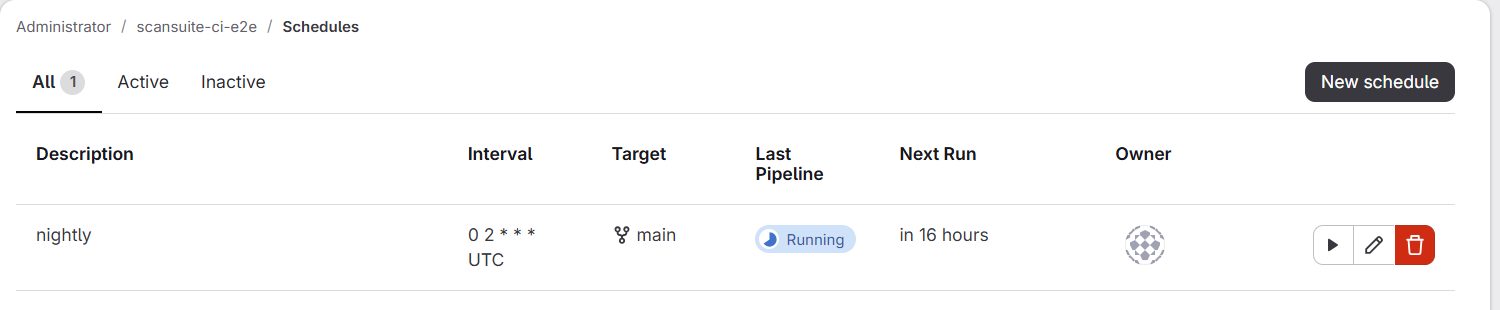
SCANSUITE_MAX is a budget: no High or Critical findings, up to ten Medium. In the test the nightly scan reported 2 Critical, 3 High and 2 Medium findings; the 5 High and Critical ones failed the job, the Medium ones stayed within the budget.
SCANSUITE_TIMEOUT lets the client wait up to four hours, but GitLab stops the job at its own timeout first: one hour by default, shown as Timeout on the job page. For scans that can run longer, add timeout: 4h to the job (the runner's own limit still applies).
Release gate on tags
Stricter than the merge request gate, limited to what is reachable, counting every secret the product has, and keeping the full report with the release:
stages: [test, release]

scansuite-release:
  extends: .scansuite
  stage: release
  variables:
    SCANSUITE_PROFILE: standard-ai
    SCANSUITE_FAIL_ON_SEVERITY: medium
    SCANSUITE_MIN_CONFIDENCE: reachable
    SCANSUITE_FAIL_ON_SECRETS: all
    SCANSUITE_EXTRA_ARGS: --report-zip scansuite-report.zip
  artifacts:
    when: always
    paths: [scansuite-report.zip, scansuite.json]
  rules:
    - if: $CI_COMMIT_TAG
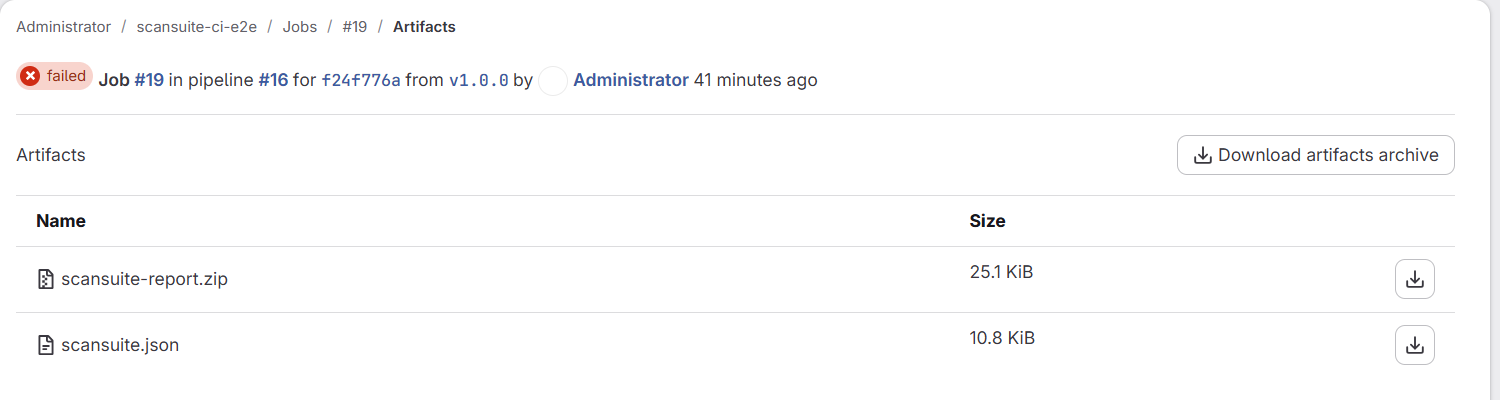
Create the tag in Code → Tags or push it. In the test the release job failed on six reachable findings, down to Medium: the injections, an SSH ingress open to the Internet in main.tf and the unpinned remote include, plus the committed GitHub token, which counts with all even though earlier scans already knew it. The report archive stays with the job:
Monorepo: one product per service
One job per service folder, each reporting to its own product, created on the first run. Pass the product as an option: a SCANSUITE_PRODUCT variable in the job would lose to the project's variable from step 2, and every service would report to the same product.
scansuite-services:
  extends: .scansuite
  parallel:
    matrix:
      - SERVICE: [payments, web]
  variables:
    SCANSUITE_PROFILE: quick-classic
    SCANSUITE_CHANGED_ONLY: "1"
    SCANSUITE_EXTRA_ARGS: --source-dir services/$SERVICE --product-name $SERVICE --create-product
  rules:
    - if: $CI_PIPELINE_SOURCE == "merge_request_event"
GitLab runs one job per service, scansuite-services: [payments] and scansuite-services: [web]. The first run of each logs Created product …; every log then starts with the product it reports to (in the test, with the products named e2e-$SERVICE: Team default, product e2e-payments (#10)). A merge request changed both services: the payments job failed on a SQL injection and the web job passed, so the merge request was blocked by one service only.
Create the product on the first run
For a new repository, let the pipeline create the product instead of preparing it in ScanSuite (the CI pipeline preset allows it). Set it on the hidden job so every job inherits it:
.scansuite:
  variables:
    SCANSUITE_EXTRA_ARGS: --product-name $CI_PROJECT_NAME --create-product
The first run logs Created product scansuite-ci-e2e (#12); later runs find it. A job that sets its own SCANSUITE_EXTRA_ARGS replaces this value, so repeat both options there. Alternatively, set SCANSUITE_CREATE_PRODUCT to 1 next to SCANSUITE_PRODUCT in the project's variables.
Roll out without blocking anyone
Scan and publish the reports, but never fail the pipeline, while the team gets used to the results:
scansuite-default-branch:
  variables:
    SCANSUITE_FAIL_ON_SEVERITY: none
    SCANSUITE_FAIL_ON_SECRETS: none
To keep failing on findings but not on a ScanSuite outage, add SCANSUITE_EXTRA_ARGS: --soft-fail instead. In the test, with the server unreachable, the client retried for about a minute, then logged --soft-fail: exiting 0 instead of 5 and the job passed.
Large repository: let the server clone it
By default the runner uploads the checkout. For a large repository, let the ScanSuite server clone the branch itself instead; with --mode incremental it then scans only what changed since its last scan of that branch.
- 01Make a key pair for ScanSuite
For example ssh-keygen -t ed25519 -N "" -f scansuite-deploy. Use it only for this.
- 02Give GitLab the public half
In the project: Settings → Repository → Deploy keys → Add new key, with scansuite-deploy.pub. Leave write access off.
- 03Give ScanSuite the private half
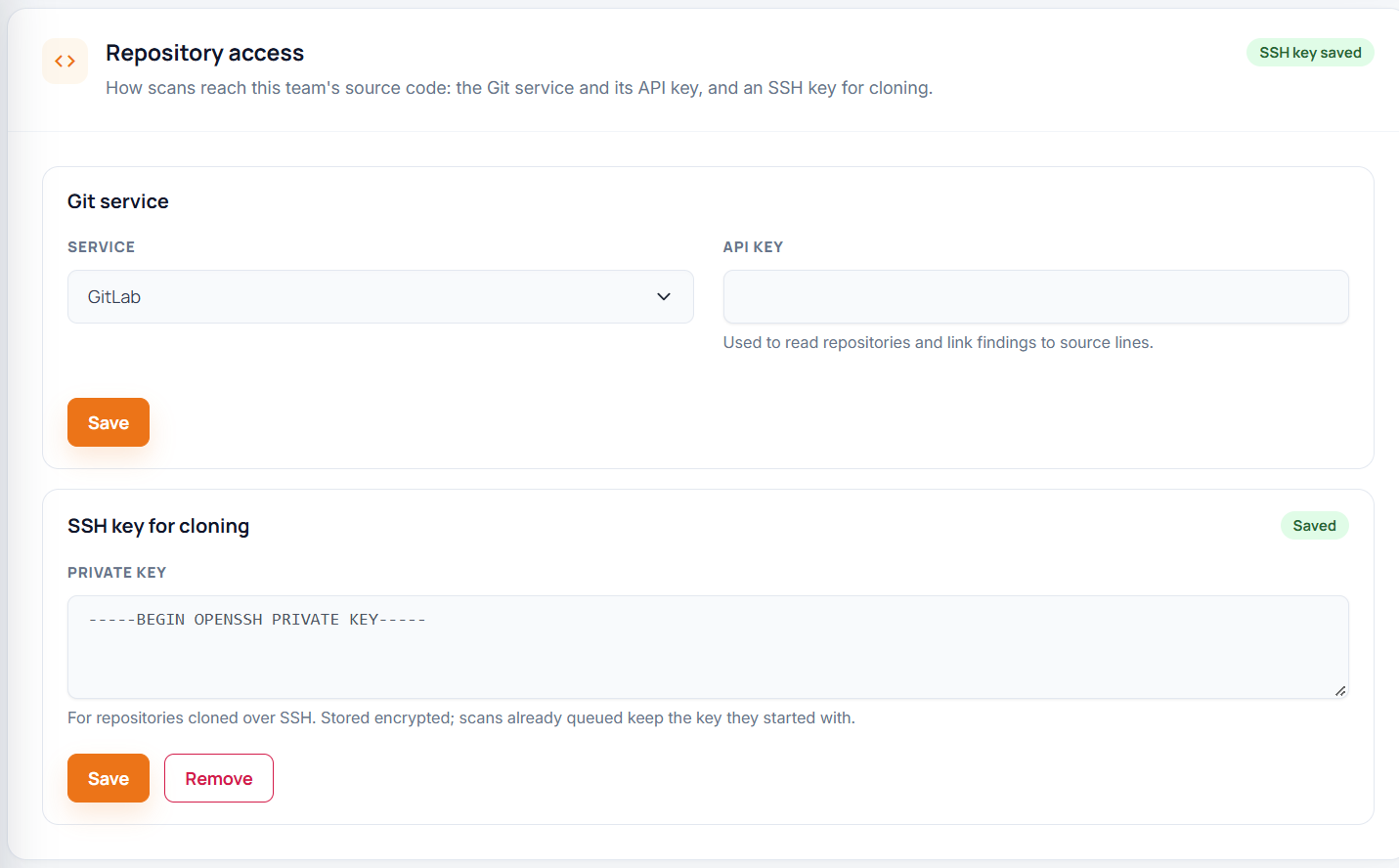
Teams page → Scanning tab → Repository access → SSH key for cloning: paste the content of scansuite-deploy and Save. Then delete the file.
- 04Add the job
With the SSH address of the project. A GitLab whose SSH port is not 22 needs the ssh:// form with the port, as below.
scansuite-incremental:
  extends: .scansuite
  variables:
    SCANSUITE_SOURCE: git
    SCANSUITE_GIT_URL: ssh://git@gitlab.example.com:2222/$CI_PROJECT_PATH.git
    SCANSUITE_PROFILE: standard-ai
    SCANSUITE_EXTRA_ARGS: --mode incremental
  rules:
    - if: $CI_COMMIT_BRANCH == $CI_DEFAULT_BRANCH
The log names the source as ssh://…/scansuite-ci-e2e.git @ main (the server clones the branch head, not necessarily …): the server scans the branch as it is when the scan starts, which can be newer than the pipeline's commit. In the test the first run cloned and scanned the whole branch (and failed on the planted findings); the second logged Nothing to scan: … no new commits since successful scan hzyljnog and passed in 13 seconds.
The server trusts the Git server's SSH host key the first time it clones and refuses a changed key afterwards. If GitLab is reinstalled or moved and its host key changes, clones stop with could not resolve the remote revision: @@@@… until a ScanSuite administrator removes the old key from /var/tmp/scansuite/git-auth/known_hosts in the worker container.
Without the template
If you cannot include a remote file, write the job yourself. Clear the image's entrypoint, because GitLab runs its own shell in the container:
scansuite:
  stage: test
  image:
    name: appsec4u/scansuite-ci:1
    entrypoint: [""]
  variables:
    GIT_DEPTH: "50"
  script:
    - scansuite-ci --profile quick-classic --changed-only --junit scansuite-junit.xml --sarif scansuite.sarif
  artifacts:
    when: always
    reports: { junit: scansuite-junit.xml }
    paths: [scansuite.sarif]
  rules:
    - if: $CI_PIPELINE_SOURCE == "merge_request_event"
AI scans one scanner at a time
--scanners and --options replace a bundle's choice. Pass them in SCANSUITE_EXTRA_ARGS:
# AI SAST with every option
scansuite-ai-sast:
  extends: .scansuite
  variables:
    GIT_DEPTH: "0"
    SCANSUITE_EXTRA_ARGS: >-
      --scanners mlsast
      --options mlsast_reachability,mlsast_security_architecture,mlsast_boundary_hunt,mlsast_git_history

# Dependencies: only CVEs AI confirmed reachable fail the job
scansuite-ai-deps:
  extends: .scansuite
  variables:
    SCANSUITE_MIN_CONFIDENCE: reachable
    SCANSUITE_EXTRA_ARGS: --scanners dep_checks --options dep_checks_reachability

# Secrets: only verified secrets new to the product fail the job
scansuite-ai-secrets:
  extends: .scansuite
  variables:
    SCANSUITE_FAIL_ON_SEVERITY: none
    SCANSUITE_FAIL_ON_SECRETS: new
    SCANSUITE_EXTRA_ARGS: --scanners secrets --options secrets_ai
In the test, the dependency job passed: requirements.txt pins versions with known CVEs (the classic scan failed on them), but AI found none of them reachable from the application's code. The secrets job passed too: the only verified secret was already known to the product, and new counts only secrets this product did not have.
The AI SAST job with every option took under four minutes on the sample application and failed on two Critical and three High findings across app.py and both services, each with the code location that makes it reachable.
Private CA
When the ScanSuite server's certificate comes from your own CA, commit the CA certificate and point the client at it. Without it the client warns and continues without verifying the certificate; SCANSUITE_STRICT_TLS: "1" makes that an error instead.
.scansuite:
  variables:
    SCANSUITE_CA_BUNDLE: ci/corp-root.pem
Troubleshooting
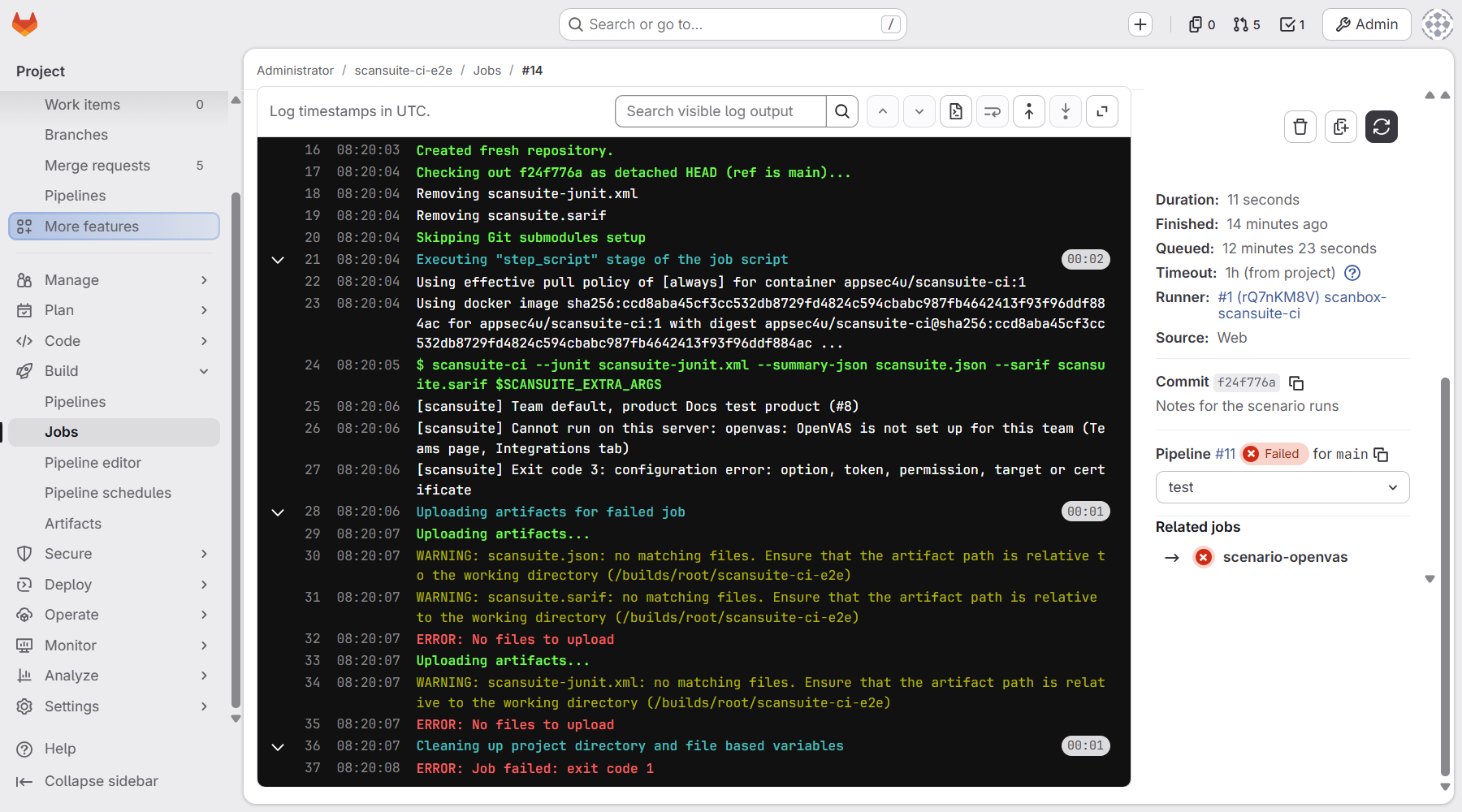
GitLab ends every failed job with ERROR: Job failed: exit code 1, whatever went wrong. The client's last [scansuite] line has the real exit code:
| Exit code | Meaning | What to do |
|---|---|---|
| 0 | Passed, or nothing to scan. | — |
| 1 | The gate failed on findings or secrets. | Read the BLOCKING lines or the Tests tab; fix, or triage in ScanSuite. |
| 2 | The scan failed, was cancelled or refused, or a scanner did not complete. | The log names the scanner; open the scan in ScanSuite. |
| 3 | Configuration: option, token, permission, target or certificate. | The line before it says what to change. |
| 4 | Timed out waiting for the scan (2 hours by default). | Raise SCANSUITE_TIMEOUT (seconds). |
| 5 | ScanSuite unreachable. | Check the runner's network path to SCANSUITE_URL. |
| Message or symptom | Cause and fix |
|---|---|
| Set SCANSUITE_TOKEN ... | The token did not reach the job. It is Protected and the pipeline runs on an unprotected branch (step 2), or the variable is missing. |
| Product 'X' was not found in team Y | SCANSUITE_PRODUCT does not match a product name exactly, or the team is wrong. Add --create-product to create it. |
| The API token lacks permission(s): ... | The token was issued without the CI pipeline preset, or the service account is a Reader. Issue a new token. |
| Cannot run on this server: openvas: ... | The scanner is not set up for your team; the message says where to set it up. |
| Findings land in the wrong product | A job sets SCANSUITE_PRODUCT, but the project's variable wins. Pass --product-name in SCANSUITE_EXTRA_ARGS. |
| --changed-only: no base to compare with | Not a merge request pipeline, or the clone lacks the target branch. The job then scans everything. |
| This is a shallow clone, so Git history analysis sees only ... | Set GIT_DEPTH: "0" on full-ai and other Git history scans. |
| A later-stage job was skipped | A scan in an earlier stage failed. Give the job needs: []. |
Cancelling a job cancels its scan. When you cancel the pipeline in GitLab, the client stops the scan in ScanSuite before the job ends (Cancelled scan zbepcxtn (pipeline interrupted)), so a forgotten pipeline does not keep a scanner busy. When the client itself stops waiting (SCANSUITE_TIMEOUT, exit code 4), the scan keeps running unless you add --cancel-on-timeout.
The full option reference, including DAST authentication, infrastructure scan options and the other CI systems, is in CI/CD and automation.
Last reviewed 2026-10-03