Configuring API keys for external systems
AI providers, scanners and third-party services that need credentials.
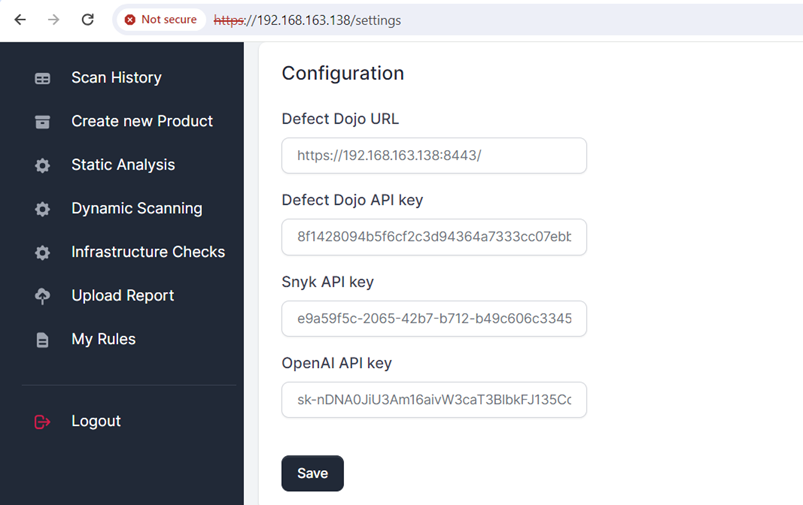
To enable specific security scanning and AI-powered analysis features, API keys must be configured in ScanSuite. They belong to a team: team admins and operators open Team integrations in the user menu, and the values apply to the current team only. Other teams never see them, and stored passwords and keys are never shown again.

OpenVAS (infrastructure scans)
ScanSuite requires OpenVAS credentials to execute infrastructure scans.
- Specify the OpenVAS URL, username and password in Team integrations.
- OpenVAS can be installed on either the same host as ScanSuite or a separate server.
- Follow the official OpenVAS installation guide.
AI provider (AI-powered features)
The AI engines — static analysis, web scanning, the pentest agent, generated rules and documentation — all run through the team's AI configuration, chosen under Teams → Team settings → AI provider: the platform default, a team override, or no AI (see AI providers and cost). A team override, and the system default in administration, take the fields below. Choose the provider first; the fields change accordingly.
OpenAI-compatible
Any endpoint implementing the OpenAI API specification works, so this covers hosted OpenAI, compatible gateways, and models running locally on the internal network.
| Field | Description |
|---|---|
| HTTPS API endpoint | The API base URL. It must use HTTPS. Point it at a runtime on the internal network for an offline deployment. |
| Model | The model identifier to use for generation. |
| API key | Your API key. |
- Obtain a hosted API key at OpenAI API key management.
- Or set up a connection to an LLM on the local network — see Ollama OpenAI compatibility. Serve it over HTTPS, for example behind a reverse proxy. If its certificate comes from an internal CA, configure it as the system default in administration, which can name a CA bundle; a team override cannot.
Vertex AI Anthropic
Claude models served through Google Cloud Vertex AI.
| Field | Description |
|---|---|
| Google Cloud project | The project hosting the Vertex AI endpoint. |
| Region | The region the model is served from. |
| Model | The Claude model identifier. |
| Service-account key | The JSON key of a Google Cloud service account with access to Vertex AI. |
Keys are stored encrypted and never shown again; leave the field empty to keep the saved key. TLS verification cannot be switched off. Behind a TLS-inspecting proxy, an installation administrator sets a CA bundle on the system default.
LLM generations language, under Additional Settings in Team integrations, controls the language the models write their findings and reports in. AI token usage is recorded per team; the platform and the team can each set a monthly limit.
Dehashed (leaked credentials, OSINT)
A Dehashed API key is required to query leaked credentials for domain names analysed during an infrastructure OSINT scan.
- Obtain an API key at dehashed.com.
Shodan (OSINT scans)
A Shodan API key is required to check for known services and vulnerabilities on hosts discovered during an infrastructure OSINT scan.
- Obtain an API key at Shodan API key management.
Snyk (SCA and SAST scans)
A Snyk API key is required for Snyk-based security scans. Obtain a free key as follows:
- 01Create a Snyk account
Sign up or log in at app.snyk.io.
- 02Enable Snyk Code
Under the organisation settings, enable Snyk Code for static code analysis.
- 03Generate an API token
From the Snyk account settings, create and copy the auth token.
Other integrations on this page
| Section | What it configures |
|---|---|
| Defect Dojo | URL and API key for the vulnerability management system. Covered in Set up DefectDojo. |
| Acunetix | URL, username and hashed password for web application scans. |
| Securitm | URL and API key, for exporting findings to Securitm. |
| Email alerts | SMTP server, sender address, sender password and the recipient list for scan notifications. |
| Telegram alerts | Chat ID and bot key for scan notifications. |
| Git repository | Repository type, the Bitbucket URL template and the team repository API key. The SSH key that clones repositories is a team scan credential, set in Team settings. |
| Nessus runs limit | Shown for reference only. An installation administrator limits the shared Nessus for all teams. |
Entering the keys
- 01Open Team integrations in the user menu
- 02Locate the respective fields
- 03Enter the keys exactly as provided by the respective platforms
- 04Click Save to apply the settings
Last reviewed 2026-09-29