Architecture
Microservices, worker fan-out, containerised scanners and deployment models.
ScanSuite is built on a highly scalable microservices architecture, ensuring modularity, flexibility, and efficient resource utilization. Each component operates independently within containerized environments, allowing seamless horizontal scaling based on workload demands.
Scanning tasks are distributed across a pool of worker nodes, enabling parallel execution for improved performance and fault tolerance. Each available worker dynamically retrieves a task and executes it by invoking one or more scanners running in isolated Docker containers. This architecture supports unlimited scalability in parallel scanning, optimizing execution speed and system stability.
Findings of the AI-driven scans are parsed, normalised, deduplicated and stored in ScanSuite's own Vulnerabilities section, where they are triaged, owned and tracked to closure. Scan reports are available for download. Most classic scanners export their findings only to those reports and to DefectDojo, so DefectDojo is recommended when you run them.
ScanSuite supports integration with external infrastructure scanners, enabling organizations to consolidate and manage all security scans from a unified ScanSuite console. This provides a single pane of glass for security teams to oversee scan operations efficiently.
Deployment topology
Server components can be deployed in cloud, on-premises, or hybrid environments, offering flexibility to adapt to various infrastructure needs. The following diagram illustrates an example deployment of ScanSuite's architecture:
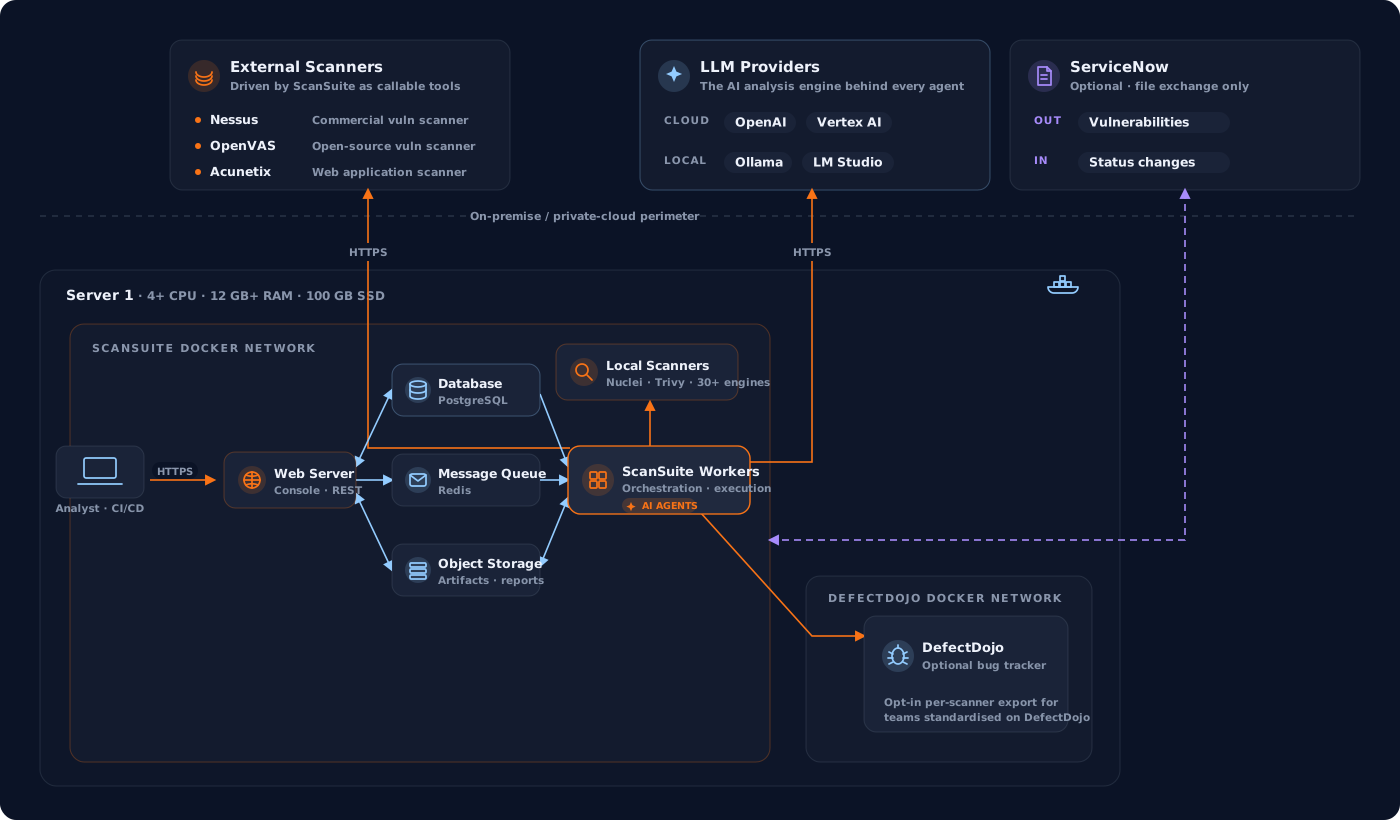
Here ScanSuite runs on a single server (Server 1). The ScanSuite workers orchestrate every scan: they run the local scanners bundled in the platform, drive the external scanners (Nessus, OpenVAS, Acunetix) as callable tools over HTTPS, and reach a cloud or local LLM provider for the AI analysis behind every agent. External scanners and LLM providers can sit on the same host, on separate servers, or off-site — anything reachable over HTTPS — while code and findings stay inside the perimeter.
DefectDojo is shown co-located on Server 1. It is recommended for the classic scanners, most of whose findings reach nothing but the scan reports without it. It can run on the same host or on a separate server reachable by ScanSuite over HTTPS.
ServiceNow appears on the diagram without a network link, which is the whole point: ScanSuite never connects to it. Findings leave as a ServiceNow XLSX export that someone uploads, and the statuses ServiceNow assigns come back as a file that ScanSuite reads. No credentials are stored, no port is opened, and nothing leaves the perimeter unless a person sends it — which is what makes the integration usable in environments where an outbound API call would never be approved.
For production purposes it is recommended to set up a separate PostgreSQL cluster and point ScanSuite — and DefectDojo, if you use it — to the respective instances, as described in the Administration section.
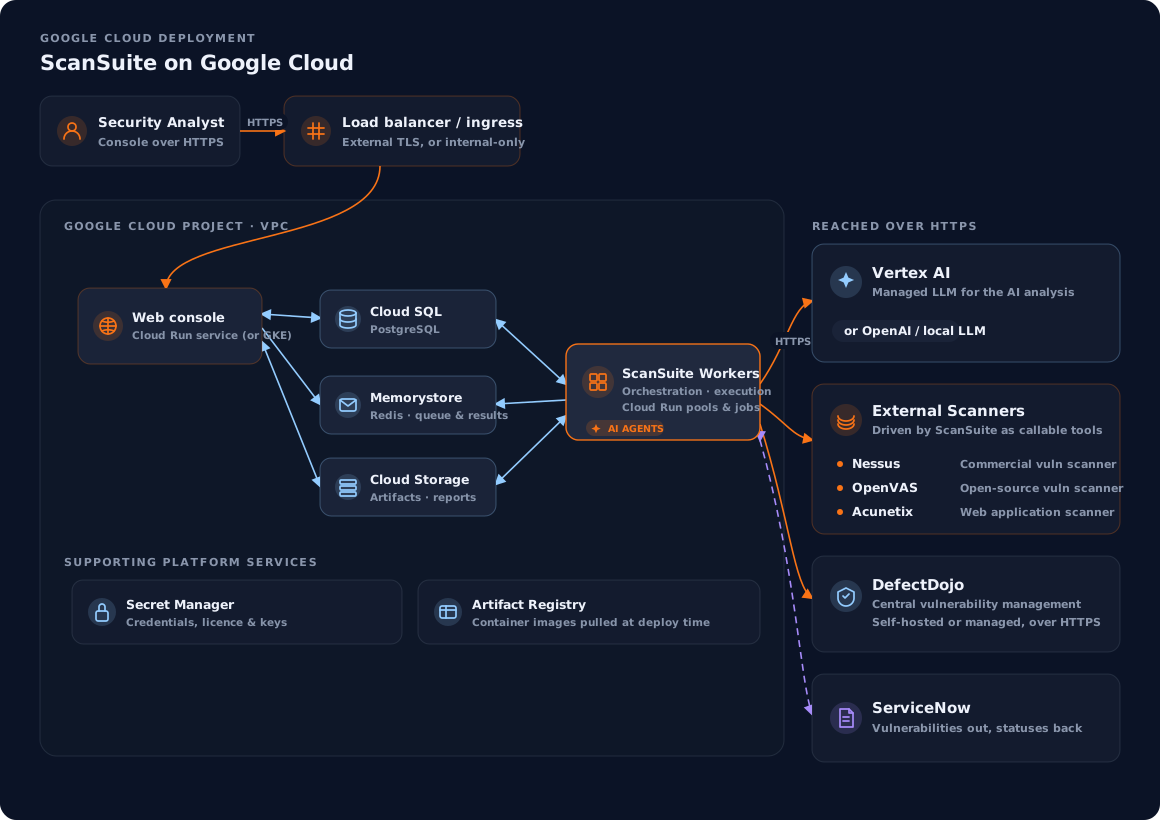
The same architecture also runs as a cloud-native deployment on Google Cloud, where each component maps onto a managed service. The console and scan workers run on Cloud Run (or GKE), backed by Cloud SQL for PostgreSQL, Memorystore for the Redis queues, Cloud Storage for scan artefacts and Secret Manager for credentials, with container images served from Artifact Registry. The AI analysis uses Vertex AI as the LLM provider, while external scanners and DefectDojo remain reachable over HTTPS. ServiceNow needs no connection at all: findings leave as spreadsheet files and statuses return the same way, so code and findings stay inside the project's VPC:
On Microsoft Azure the same architecture runs on Azure Container Apps. The console and the orchestration workers run as container apps, and every scan runs as its own Container Apps job execution, which starts with the scan and is gone when it ends. They are backed by Azure Database for PostgreSQL (Flexible Server, reachable only from inside the network), Redis for the task queues, Blob Storage for scan artefacts and Key Vault for credentials, with container images served from the deployment's own Container Registry. Storage, Key Vault and the registry are reached with managed identities rather than stored keys. The AI analysis can use Azure OpenAI through its OpenAI-compatible endpoint, or any other supported provider. The ingress admits only the address ranges you allow, and code and findings stay inside the resource group's virtual network:
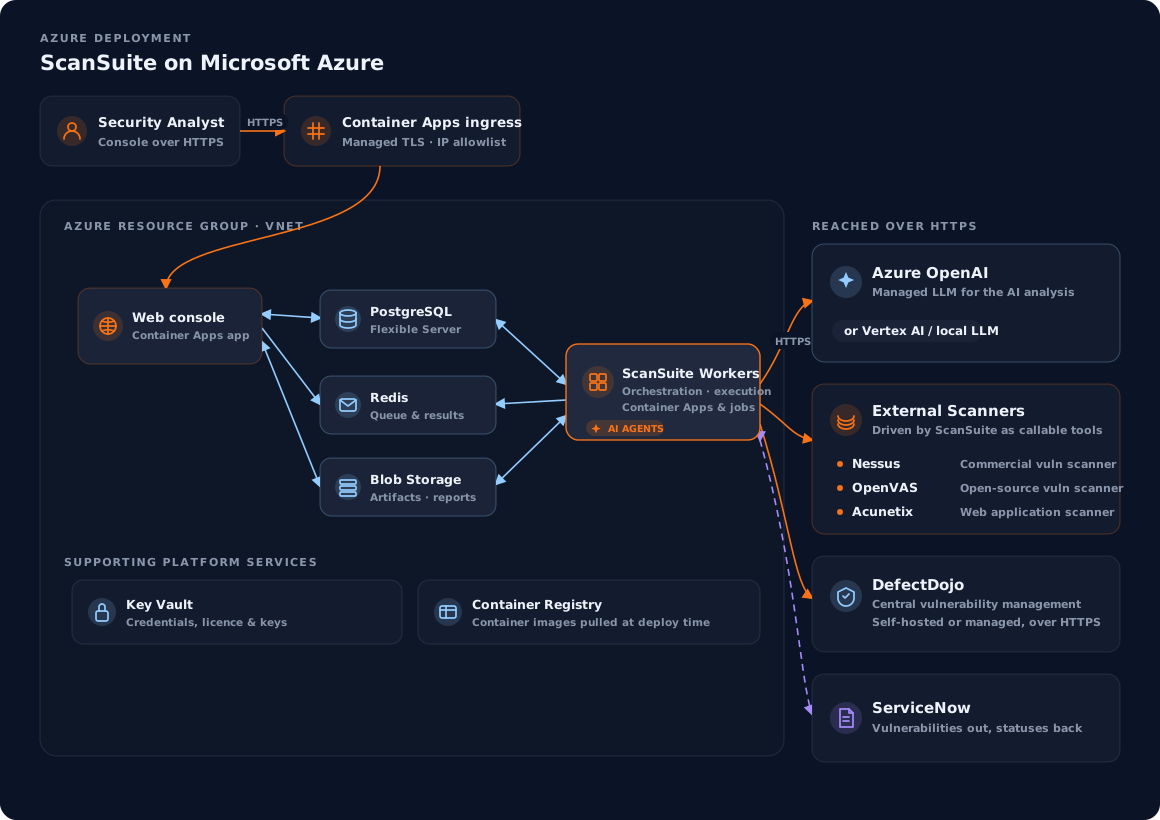
The Azure deployment is built by a Terraform configuration shipped in the azure folder of the installation repository: one command creates everything in a single resource group, and one command removes it. Container Apps has no Docker daemon, so scanners that run as containers of their own need a Docker host. On Azure, ScanSuite covers the static analyses (code, dependencies, infrastructure as code, secrets and the AI code review), and external scanners remain reachable over HTTPS.
Last reviewed 2026-08-15