Global search and system logs
Finding anything across assets, vulnerabilities, scans and credentials.
Global search
The search box in the top navigation queries four record types at once and returns them in one result list. It searches the current team only; switch team to search another.
| Type | Fields searched |
|---|---|
| Assets | Name, IP address, ports, severity, notes, technology, groups, tags, scan date and ID. |
| Vulnerabilities | Titles, CVEs and targets. |
| Scans | Scan history records. |
| Credentials | Stored and discovered credentials. |
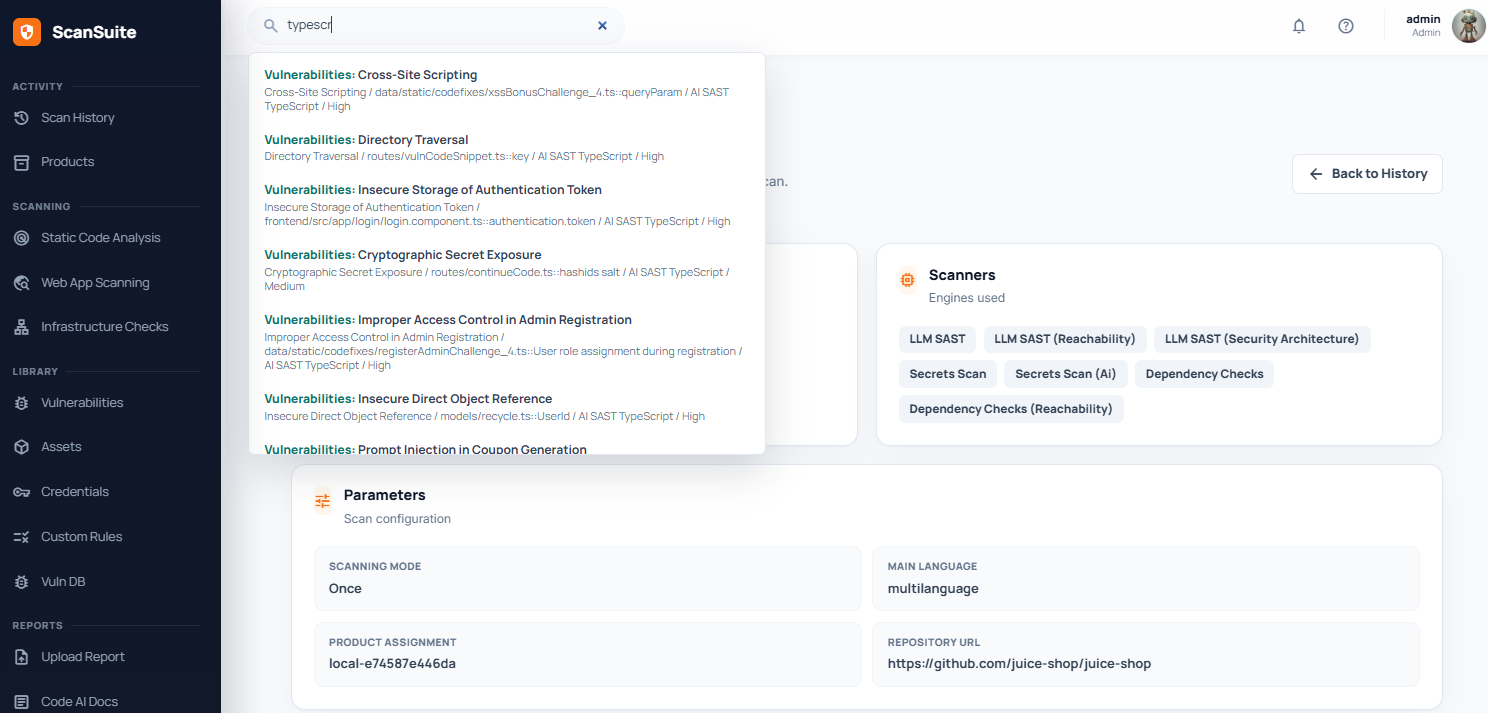
Search requires at least three characters. Shorter terms return nothing rather than everything.
This is the fastest way to answer "have we seen this host / CVE / credential before?" without knowing which product it was filed under. For searching within a single view, each page has its own filter — Scan History, Assets and Vulnerability Management all search their own records.
Audit logs
Security-relevant activity in a team — member and account changes, sign-in configuration, integrations, policies and report downloads — is recorded in the team audit log, which team admins read under Teams → Team settings → Security audit.
See Security logs for the administrator's view, and Troubleshooting for the container and service logs that live on the host rather than in the console.
Last reviewed 2026-09-25