Setup parameters and services
The scansuite command, .env, services, boot and database resets.
The scansuite command
An installation is administered with one command in /opt/scansuite. Run it without arguments to see the list:
| Command | What it does |
|---|---|
| ./scansuite install <code> | Install this host, or repair one. The code is the six characters at the end of your licence file name. Safe to run again. |
| ./scansuite update [<code>] | Fetch the current release and apply it. The code is read from the licence file when you leave it out. |
| ./scansuite start [workers] | Start, waiting until every service reports healthy. The number of workers for parallel scanning defaults to 2. |
| ./scansuite stop | Stop every service. |
| ./scansuite restart [--hard] | Restart. --hard recreates the containers instead of converging them. |
| ./scansuite status | What is running, and what needs attention. |
| ./scansuite logs [service] | The last 200 log lines, for one service or all of them. |
| ./scansuite doctor | Check the host and the installation: Docker, ports, disk, clock, licence, certificate, settings and services. |
| ./scansuite version | The release, what it was built from, your licence and the images actually running. |
| ./scansuite reset db | Empty the ScanSuite database and start over. Asks first. |
| ./scansuite dojo password | Read the DefectDojo administrator password, or change it. |
| ./scansuite reset dojo | Empty the DefectDojo database and start over. |
| ./scansuite offline save|load <dir> | Move every image this installation needs to a host with no registry access. |
| ./scansuite uninstall [--purge] | Stop ScanSuite and remove its boot service. --purge also deletes the database and the stored files. DefectDojo is left running — see Troubleshooting. |
Updating
One command fetches the release and applies it. It saves your settings, updates the installation files, pulls the images for your licence, refreshes the boot service and recreates only the services that changed:
cd /opt/scansuite && ./scansuite updateBelow is an example cron job (run sudo crontab -e to set one) for weekly automatic updates:
0 3 * * 4 cd /opt/scansuite && ./scansuite update --yes > /home/USER/scansuite-update.log 2>&1Update through ./scansuite update rather than git pull. The update saves your .env before fetching and puts it back; a bare pull can leave the installation without its settings.
Installing or updating also accepts options for the parts you do not use, which saves downloading scanners this host will never run:
./scansuite update --no-scanners   # no external scanner containers (the default)
./scansuite update --static-only   # only the static analysis scanners
./scansuite update --dynamic-only  # only the dynamic analysis and infrastructure scanners
./scansuite update --all-scanners  # every scanner
./scansuite update --no-dojo       # stop DefectDojo; its data is kept
./scansuite update --with-dojo     # bring DefectDojo back
./scansuite update --workers=4     # start with four scanning workers
The scanner and DefectDojo choice is saved in .env as SCANSUITE_SCANNERS and SCANSUITE_DOJO, so later updates and starts keep to it until you give another option. --scanners=all|static|dynamic|none is the same choice in one option.
The .env file
ScanSuite components, such as the database or the message queue, can run on different hosts. In that case, connection strings and credentials are passed through the .env file located in the /opt/scansuite folder:
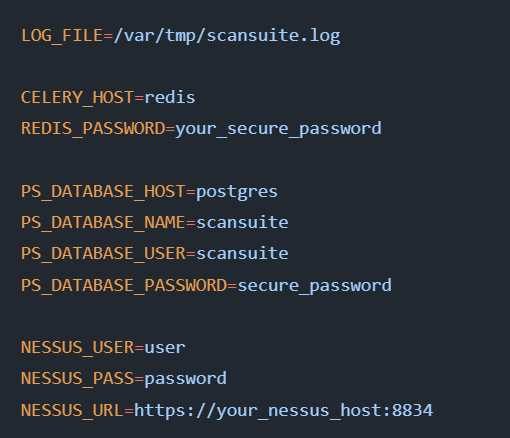
The file is created on the first install, with its passwords generated for this host and its timezone taken from the host clock. It belongs to the host, not to the release: updates never overwrite it, and it is the one file to keep with your backups.
| Parameter | Purpose |
|---|---|
| SCANSUITE_TAG | The release this host runs. Written by install and update — do not edit it by hand. |
| LOG_FILE | The ScanSuite log file. It must be reachable from inside the container — by default only /var/tmp is mounted, so adjust docker-compose.yml to mount another folder for alternative log storage. |
| CELERY_HOST, REDIS_PASSWORD | Redis connection parameters. |
| PS_DATABASE_* | PostgreSQL database connection parameters. |
| NESSUS_* | Read once, when a release that encrypts stored credentials first starts: the values are moved into Settings, where Nessus is set up from then on, and are not read again. |
| TZ | The timezone every service logs and schedules in. |
| SCANSUITE_SCANNERS, SCANSUITE_DOJO | Which scanner containers (all, static, dynamic or none) and whether DefectDojo this host installs. Set by the install and update options. |
| COMPOSE_FILE | Which compose files this installation runs: the release's own, the optional services of this edition and docker-compose.local.yml when the host has one. Set by the installer on every install, update and start. |
| SECRET_KEY, SCANSUITE_WRAPPING_KEYS | The keys that encrypt stored integration, identity and AI credentials. Generated on the first install and mirrored from key/scansuite-secrets.env; without them those credentials cannot be decrypted. |
The passwords in .env are generated per installation and are not written anywhere else. Keep the file with your backups: without it the existing database cannot be opened.
Database and Redis passwords
PostgreSQL and Redis run as containers of the installation, reachable only on its own Docker network (as postgres and redis) and never published on the host. The two passwords are generated once, on the first install, and kept only in .env. To change one, edit PS_DATABASE_PASSWORD or REDIS_PASSWORD and restart: Redis is recreated with the new value, and the database account is changed to match before the services start.
cd /opt/scansuite && ./scansuite restartUse letters and digits, as the generated passwords do. Docker Compose reads .env and treats a $ as the start of a variable name, so a password containing one reaches the services changed.
Files worth knowing about
| Path | Contents |
|---|---|
| .env | This host’s settings and secrets. Not part of the release. |
| key/ | Your licence file, and the service account key if you use one. |
| RELEASE | Which release this is and what it was built from. Printed by ./scansuite version. |
| scanners.d/ | The scanner images this release pulls. Adding a scanner reaches every installation as a file change, with no new installer. |
| docker-compose.yml | The services. Never edited on the host — the release is chosen by SCANSUITE_TAG in .env, which keeps updates conflict-free. |
| docker-compose.local.yml | Optional, and yours: what this host changes, for example publishing the console on 127.0.0.1:5000 for a web server the host already runs. Updates never touch it and every start includes it. |
| services/nginx/certs | Your custom SSL private key and certificate in .pem format for the ScanSuite web server. |
| defectdojo/certs | Your custom SSL private key and certificate in .pem format for the DefectDojo web server. |
| services/nginx/default.conf.template | The nginx configuration file. Adjust as required, including for a non-default certificate location — for example when certificates are managed by certbot. |
| services/nginx/scan-dojo.example | An example nginx config that reverse-proxies both ScanSuite and DefectDojo through a single ScanSuite nginx instance. |
The certificate shipped with ScanSuite is self-signed and meant to be replaced. Browsers will warn until you install your own.
Starting at boot
Install and update register a systemd service, so ScanSuite comes back with the host. It is rewritten on every run, which means a fix to it reaches existing installations:
systemctl status scansuite
sudo systemctl disable scansuite     # stop starting it at boot
Resetting the databases
./scansuite reset db
Wipes the ScanSuite database. Everything scanned, found and configured in the application is deleted; the licence, the settings in .env and the certificates are kept.
The next start serves the setup form again, so the first team and its administrator are created from scratch.
./scansuite reset dojo
Wipes and recreates the DefectDojo database. This also triggers generation of a new admin user. Wait a few minutes and run ./scansuite dojo password.
Do not forget to fetch the new DefectDojo API key afterwards and update the ScanSuite settings accordingly, or result uploads will start failing.
The DefectDojo password is removed after a restart, so write it down and save it in a secure location.
Installing without a registry
A host with no route to the image registry is installed from a directory of images prepared on one that has. Run the first command where the registry is reachable, copy the directory across, and run the second on the isolated host:
./scansuite offline save /media/transfer/scansuite-images
./scansuite offline load /media/transfer/scansuite-images
The saved set is the same list the online installer uses, and it is checksummed on the way out and verified on the way in.
ScanSuite certificate handling is covered in SSL/TLS Setup; DefectDojo has its own — see Set up DefectDojo.
Last reviewed 2026-09-29